Houzz Logo Print
joann_fl

Microsoft Edge?

3 years ago
last modified: 3 years ago

Do you have problems with it? Should I change the browser to something better? I keep getting the message Microsoft is not responding. Its extremely slow tonight and I just did scans.

Comments (34)

  • 3 years ago

    i think it slowed down Firefox. Edge is running fast for me.

  • 3 years ago
    last modified: 3 years ago

    I won't suggest another browser because I think that's a personal decision only you should/can make but I will offer that when my system acts up the way yours is, it's usually indicative of an update lurking around waiting to be applied. Today was update day for Windows. It was a lulu...and took time. Perhaps , Joann, that's what's causing your slow down. Check the Window's update website and see.

    joann_fl thanked User
  • Related Discussions

    W10 & Garden Web

    Q

    Comments (16)
    I'm not a Microsoft Edge user but if I were having a problem like that with another browser I'd probably... Clear history, both cache and cookies. Make sure the browser is accepting cookies. Look for a way to reset the browser. If none of that worked, and I could login with all my other browsers, just not Microsoft Edge, the new one( the variable), I'd probably be inclined to blame it on Microsoft Edge and wait for an update to fix it. Especially if I googled and found as many others having similar problems: https://www.google.com/search?biw=1919&bih=892&tbs=qdr%3Am&q=Microsoft+Edge+cannot+login|%22log+in%22&oq=Microsoft+Edge+cannot+login|%22log+in%22 Like I say though, I don't use Microsoft Edge, just thinking out loud what I might do if I did.
    ...See More

    Is there a browser I can like?

    Q

    Comments (8)
    Imagine standing in a garden store, trying to assess which of three different garden hoses of identical physical size and with essentially the same functionality and material you should get. To me, the choice of a browser is a similar choice. They all do the same thing, they all have the same features (more or less), they all work the same way, they all function with the same speed and capability. In use, the differences between one browser and another are mostly imperceptible and irrelevant. What differs between them? Appearance of basic screens. Menu trees. Ease and accessibility of changing settings. Availability and nature of add-ons (though most are frankly not worthwhile to have). In short, superficial things that most users rarely deal with. In use, they are the same. The same. If you don't like one, pick another from among the half-dozen most popular ones. They're all free, easy to use, easy to switch to and easy to switch from.
    ...See More

    testing, testing, testing

    Q

    Comments (1)
    well, finally! I can't post with my android phone or with the ipad using safari.
    ...See More

    This should be easy for all you experts, I hope.....

    Q

    Comments (1)
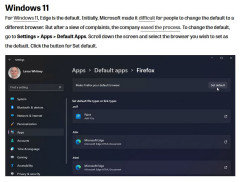
    Search for "Default Apps" in the start menu and scroll down to Web browser and change that to Edge.
    ...See More
  • 3 years ago

    I'm not sure what kind of scans you're referring to but I've found it seems to have problems with some sites. Sometimes it's slow loading, sometimes it's a lack of functionality, like being unresponsive when the user clicks on a video to have it play.

    It's not a major commitment to try a different browser, after all they all do the same thing and they're free. See if you experience is different with another one.

  • 3 years ago

    You should always have more than one browser, in case one stops working correctly. I would recommend Chrome or Firefox, but there are others available.

  • 3 years ago

    My newest computer came with Windows 11 and the default browser is Edge, which I use and it works fine. However, I also have Chrome and use it also. One reason is that I prefer Google to Bing as a search engine.

  • 3 years ago

    Any search engine can be used with any browser by indicating it as the preference it in the browser's settings, or simply ad hoc typing the URL for it into the address bar. I have Firefox set to open to a blank page. I am more than half the time not needing to search for something but rather going to one of the many websites that I visit daily for which I either know the URL or have it bookmarked. I type in Google (or occasionally some other search engine) when I want to do a search.

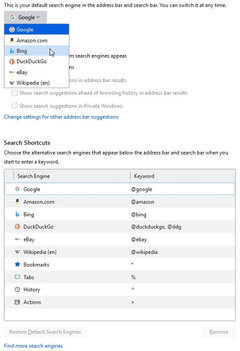
    Firefox has Bing as a default search engine choice, and some other related choices and settings.


  • 3 years ago

    Chrome is my "go-to" browser. I don't use Edge very often.

  • 3 years ago
    last modified: 3 years ago

    I'm surprised that no one has mentioned DuckDuckGo as a search engine. I've used it for years...backed up with Google in second place. then Wikipedia. DuckDuckGo is an excellent and very safe search engine I'm using Win.version 22H2 with Office 365. Dadoes...I found no listing for Bing as Firefox's' preferred search engine and I have the current Firefox version 111.0.

  • 3 years ago

    I have Firefox 111.0 installed. The photo above is a screenshot directly from it. "Find more search engines" opens to Add-Ons for extensions to specific search functions.

    I use DuckDuckGo on occasion by entering it into the address bar ... easy-peasy.

  • 3 years ago

    I had 2-3 instances of Edge not responding this morning after the update; after those first few, no further issues today. I did also discover that my antivirus (both Avira and Windows Defender) had been turned off, and OneDrive turned back on - so had to reverse that (they turn OneDrive back on with every update, so annoying! I have everything I want backed up there, already there, and don't want it to be continually syncing. But this is the first time I've had my antivirus turned off with an update)

  • 3 years ago

    I don't use Edge. I have Fire Fox as my default browser. It opens with Google search as default search. No problems.


    Jane

  • 3 years ago

    I've been using Fire Fox and Safari as a backup for many years. There are a few sites that won't work with either browser. It's rare but for instance I cannot access the PA Game Commission unless I use Chrome or Edge on DH's computer. There are a few merchants that I have to access on Safari.

    I'm thinking now about trying Chrome.

  • 3 years ago

    As Elmer says it's a good idea to have several browsers. Sometimes one or the other will work (or not) on a particular site. On my Win10 Pro it came w/Edge and Chrome, but I use Firefox 'cause that's what I'm used to. My Linux also uses Firefox and syncs w/the Windows Firefox for bookmarks, etc.

  • 2 years ago

    I put chrome on but its only showing edge. This gets so confusing.

  • 2 years ago

    Does any mobile browser work well with houzz?

  • 2 years ago
    last modified: 2 years ago

    I had a video appointment with my sleep doctor yesterday, and I had to use Chrome instead of Firefox, but I use Firefox more than 90% of the time. When filling out forms for my mortgage, I had to use Chrome also. I use Facebook only on Chrome because I do not want to use Facebook for logging onto new sites. I know I can choose not to, but I do not want even the option to be shown. I generally visit Facebook only once a month or so, but I need it for keeping in touch with a few friends.

    On my phone, I use Samsung Internet, which works the best for me for that, but I never visit any social media sites on my phone. I hate typing on a phone, and I hate texting. I can type very fast on a keyboard, and so I prefer to use my desktop or laptop for communicating. For me, texting is a last resort, when I have to communicate with someone who does not have email. I generally turn my phone off in the evening and sometimes leave it off for a day or two. I have my computer on much more than my phone.

    For a third browser, I use Brave, which is very much like Opera, which I used to use.

  • 2 years ago
    last modified: 2 years ago

    food, Firefox works pretty well for me on my phone.

    As to other browsers, I use Firefox with dual ad block on my desktop, and use Chrome without any ad blocking when something won't load on it. I think the ad block can sometimes block things that shouldn't be blocked. If I run into a problem with neither of those working, I will make triple sure and use Edge. If it doesn't work at home with any of the three, I'll try it again at work, with as many browsers and setups as I can before I report any problems with functionality/loading. I just like to go the extra mile. It's saved me more than once when there's a conflict I'm not interested in solving. I'd rather get done and move on.

  • 2 years ago

    Let's see how this works. Ok it's lagging but doesn't seem to be totally hanging up and freezing my whole phone like it does on Safari and Chrome. Knock on wood. Thanks, Rob!

  • 2 years ago

    It was a fluke. Tried to post on Firefox earlier and it hung my phone up so badly I went and emptied the dishwasher.

  • 2 years ago

    Whoa. Sorry!

  • 2 years ago

    I use Firefox on my iPhone. I often do a quick peruse the Houzz/GW board but rarely post due to the inconvenience of the tiny screen and keyboard vs. a lovely full-size computer keyboard and monitor. No trouble in the few instances I have posted a reply from the phone.

  • 2 years ago

    I use FF on my computers and phone. I have FF set as my default browser. Edge never appears. Set FF as your default and you won’t have problems.

  • 2 years ago

    I thought that Edge was included with Windows. I suppose one could uninstall it. I've used FireFox for a long time. and like it. ForeFox is written by the same crew that developed Netscape, one of the best early browsers. By acquisitions, Netscape got dumped, but its crew revived it as a free offering and named it FireFox. They also wrote an email utility called Thunderbird. I have used Thunderbird years ago, but for convenience purposes, changed to the email is part of my ISP, ATT's Yahoo. Thunderbird had the capability of leaving your emails on your ISP.s server or downloading selected messages to your computer, and one could choose, if desired, to delete the messages on the server after downloading. I don't know much about the current Thunderbird.

  • 2 years ago

    You don’t have to uninstall Edge. Not sure you can.
    Just go to settings and make Firefox your default browser. It shuts Edge off. I use FF on my phone and computers. Never see Edge, after making FF the default browser.

  • 2 years ago
    last modified: 2 years ago

    JemDandy,

    There's no need to uninstall Edge, it can simply be ignored by setting Firefox (or whatever browser one wishes to use) as the default browser ... although default-ness comes into play only when one clicks on a link outside the browser environment, so Windows knows which program to use to open the link.

    All email client programs, including Thunderbird, have the capability to leave email on the server if the account one is accessing is set up in IMAP mode (instead of POP3*). Messages in accounts set up in IMAP can also be dragged out of the server-side folders (as a Copy or Move) to Local folders (which exist only within the mail program on the computer). Multiple email accounts on different source servers can also be set up in the email program. I have five email accounts set up in Thunderbird, some GMail, some Yahoo ... and previously a work account carried on the business's separate server. I have nearly 20 YEARS of emails stored in the local folders in Thunderbird, saved from other accounts that no longer exist.

    *POP3 can leave copies of messages on the server but that's not how the protocol was intended to function. POP3 = Post Office Protocol 3. IMAP = Internet Message Access Protocol.

  • 2 years ago

    it didn't shut off it's still in charge. :^ (

  • 2 years ago

    It's not too hard to change default browsers...


  • 2 years ago

    Foodonastump, does your phone need an update?

  • 2 years ago

    @raee_gw zone 5b-6a Ohio if you mean the phone itself it's an iphone 13 pro. Should be new enough. ios is automatically updated, currently 16.5. There's one other site that locks up in a different way but Chrome resolves that. This site, just bad regardless if Safari, Chrome, and now Firedox. These are the only two sites I have regular issues with. I know not everyone has an issue but I also know I'm not alone. About 5 minutes to get this note typed.

  • 2 years ago

    Phones are awful for website access/experience compared to a computer.

  • 2 years ago
    last modified: 2 years ago

    That's subjective, I actually generally like the clean simplicity of the mobile versions of websites. When they work.

  • 2 years ago

    I'm not referring to mobile vs. non-mobile layout of websites. The entire phone experience is tedious, with tiny screens and little finger-poking keypads vs. a nice 20"+ (diagonal) wide-screen monitor and full-size keyboard.

  • 2 years ago

    We bought a laptop when my wife was going to school a couple years ago. Before that we hadn't had non-work computers in years. She finished classes last summer and a few months ago it occurred to me no one is using the laptop. Brought it down to our kitchen desk to make it more accessible and I'd say I open it once or twice a month and I'm the only one. Just what we're used to. As I'm typing (on notepad, the workaround for this site on my phone, to copy/paste into KT) it occurred to me my laptop is about four steps away!