Houzz Logo Print
antrex1941

Simple App for my recipes

9 years ago

I have been using Evernote to save my recipes but am finding it too complicated for what I need. I have nearly a thousand recipes - a lot are scanned from old cook books, although many more recent ones are from the internet.
I don't need the App to make shopping lists or create meals or give me nutritional information or any other stuff - just the recipe so that I can read it on my iPad where I can zoom in to accommodate my less than perfect eyesight!
I've looked at reviews of recipe Apps and they don't seem to give me the simple App that I need.
Any ideas?

Comments (18)

  • 9 years ago

    I use Google Keep for just about everything. It has limited ability which = simplicity. I keep recipes, all my car data (VIN, insurance data, license plates, pictures, etc.), phone contract info, vision prescription, and other stuff. Syncs between phone and computer.

  • 9 years ago

    I think the most important thing for keeping recipes is folders. My recipes are on my computer, but on the iPad I like SavySoda Documents, which is a simple writing program with nested folders which saves in .rtf files which are portable just about everywhere. It can automatically save local or to cloud, and has buttons for google, dropbox and a few others. There are different type sizes available, but I don't think you can zoom.


  • Related Discussions

    exquisite simple fig dessert recipe

    Q

    Comments (3)
    Wow, I clipped that exact recipe from the newspaper a few years ago and finally tried it this year. It is exquisite! So very simple.
    ...See More

    RECIPE: Simple appetizer / finger food recipes

    Q

    Comments (1)
    Hmm...pre-teen girls...carrots dipped into Ranch dressing, ham rollups ( slices of ham or balogna rolled jup and fastened with a tooth pick) and dipping sauce ( catsup or BBQ sauce) Nacho Cheese dip with corn chips ( one can of hormel chili with meat and beans, 1 pound velveeta cheese and 4 oz cream cheese...mix and microwave until melted, stir and serve), Apple wedges with caramel dipping sauce ( use a jar of ice cream topping heated in the micro.) Pop-corn, chips, assorted crackers... Linda C
    ...See More

    Simple website or app for drawing floorplans?

    Q

    Comments (9)
    Well Lindsy, considering even the simplest CAD program has a learning curve, for what the OP was asking, graph paper or tracing paper does work faster and better. I've tried just about all the programs, and I know I get frustrated quickly with them and found that when trying out ideas for my draftsman, it was easier to print out his CAD drawing and use tracing paper on top to make my changes. I could try out lots of ideas, one on top of the other and then easily combine ideas if I needed to. Once I did that, I was able to refine it in Photoshop, but then again I've been using Photoshop for over 15 years now. I had to do that because I wasn't working with a person of design talent. My draftsman only knew how to copy what I showed in Photoshop onto his CAD program and even then, when I showed him with redlines he still screwed it up. LOL.
    ...See More

    Must try recipe. Super simple. Sunchoke chips.

    Q

    Comments (3)
    I've never had a sunchoke! I don't think I've ever seen them for sale because I usually by any fruit or vegetable I've never seen before. Then I have to research how whatever I bought is eaten. lol.
    ...See More
  • 9 years ago

    I am happy using Google Documents. The recipes are easy to find, using iPad, iPhone or PC.

  • 9 years ago
    last modified: 9 years ago

    I've tried several recipe programs, but none fit my needs either. If I find a recipe online I want to try, I do a lot of copy and paste into a WORD doc, then convert to pdf. If it's from one of my books, I scan or take a photo and convert to pdf. As Pillog said, organization is important. I have folders on my computer for meat, bread, desserts, etc. Then subfolders such as pork, beef, poultry, etc. I email recipes I plan to try/use to myself and download them on my IpadPro. Same folders and subfolders there, too. Sounds like a lot of work, but it really isn't. It works very well for me. Didn't like the recipe? Delete! Loved it? Yay!

  • 9 years ago

    I use Pages and the search function. You can always print that to PDF if you need to.

  • 9 years ago

    Great question! I might try Google docs or Dropbox. Normally I use Word and store my recipes in a separate file, but they're only organized as Tried and True. Or To Be Tried

    However I cannot access those files from my phone I can on the Surface tablet that lived in the kitchen, but the email search function on my phone only lasts a few weeks otherwise there's too much to store Sigh

    I know that another friend uses Pepperplate, but I am personally unfamiliar with it.

  • 9 years ago

    I "print" recipes as PDF's or, if necessary, copy and past them into Word documents and save them in a file on my computer in a YUGE recipe file (3500, so far). I can email them to my iPad.

    You can open and read the PDF's on your iPad using Adobe Acrobat Reader app. It's free. You can zoom, etc. You can download from the iCloud drive, too.

    No need for any special programs.

  • PRO
    9 years ago

    I print mine on paper and then store them in plastic page protectors in a notebook. When I want to use them, I take them out of the notebook, and they are protected by the plastic while I use them. It's low tech, but it's what I prefer. I do not use thousands of recipes, but I do have about about two hundred that I use fairly frequently. Most of them I have altered to my preferences.

  • 9 years ago

    I do what Lars and Donna's husband do. I have several binders.

  • 9 years ago

    I do that too. If I'm going to use a whole recipe, I print it out and then keep it in page protectors. I have a thin soft binder for the ones I use all the time, like the daily bread with all its variants and calculations, and two overstuffed cooking binders, one with the meals and one with baking. I find it easier using the paper recipe too, and if someone asks for the recipe, I just hand it over and print a new one next time. If I only need the ingredients, however, I often just scribble them on an envelope from the recycling bin.

    Most of the recipes are in Word and filled by type for easy reference. Once in awhile, I'll cook from the iPad, but mostly if it's a new technique with videos or something. I have thought of uploading my recipes to Goggle Docs, though, so if I want the ingredients at the store I can just look.

  • 9 years ago
    Folks

    I'm impressed and thankful to all of you who have contributed your ideas. What it has done is force me to look again at my Evernote setup.

    As I read the replies I realized that the number of recipes I have (and I can't stop adding to them!!) makes transferring them to another system a major task. In particular, creating and filing a hard copy in a binder wouldn't be really practical for nearly 1000 recipes.

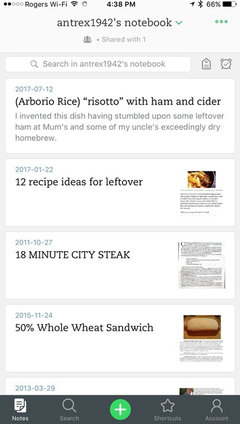
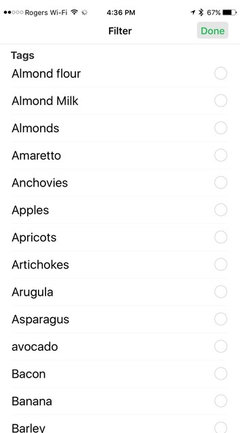
    In Evernote, I have included photos for most recipes and I have tagged them all with their main ingredients so that I can search by ingredient (I often just browse through my bacon, or eggplant or whatever set of recipes for inspiration). This is a lot of data.

    Also, to get them out of Evernote they really need to end up as PDF files.

    My problem with Evernote was that I couldn't seem to get a simple drop down list of ingredients but after my husband pottered around with my iPad we found that you could do it - see the two attached photos.

    So now I can actually recommend Evernote as perhaps the best option for what I want. On our Mac, we have it set so that it can "Print PDF to Evernote" so that I can print a website page and it goes automatically to Evernote - then all I need to do is add the tags for the ingredients.

    Thanks to you all for making me work a bit harder with Evernote!
  • 9 years ago

    Excellent!

    Generally, if I think of something I think should exist because of the current state of technology, I Google it figuring if I thought of it, someone else must have also, and implemented it. I'm rarely disappointed. Good teamwork making the app work for you.

    I have to admit, the things you use the tags for are things I currently keep in my head. :) At some point I might regret not using a fancier system.

  • 9 years ago

    At the suggestion of a friend I looked into Paprika. A very inexpensive app for many platforms. I love it. It EASILY copies recipes in from almost any website. You can categorize them (into multiple categories if you like - you define your categories); and they stay in the app even if the URL disappears. For example many of Emeril Lagasse recipes are no longer on food network.com but my recipes from there are still in my paprika. You can easily copy and paste from recipes you have in your emails or other sources (except PDF) not accessible from a URL. I have found many of my hard copy recipes on-line and bring those in with a couple of "clicks" and annotate as needed. I have manually entered those in my hard copy files that I use and agree that is not easy nor perfect but once done it is done. Paprika also keeps a back up in their cloud at no cost as long as you have your login info. I looked a long time for a user friendly app. I really enjoy taking my recipes with me "on the road" on my iPad as we travel quite a bit staying in facilities with kitchens where I actually cook. You can also upload photos, edit ingredient lists/directions, add notes, plan meals, make lists etc if you like. I do use their meal planning for large dinners as you can "pin" recipes and flip back and forth easily. If you are still in the market for an App - I suggest checking this one out.

    https://www.paprikaapp.com/


  • 9 years ago

    I also use and love Paprika!!

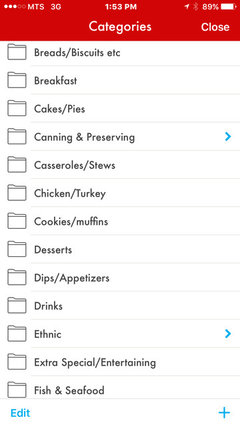
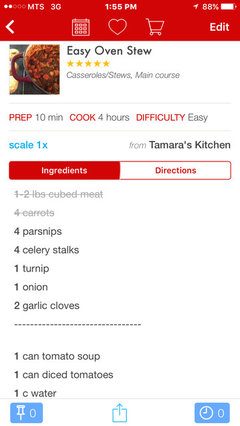
    Not free, but sooo many features. Easy to copy/create recipes, excellent customized category function with tags, the scale recipe function is awesome, along with items being stroked out as you add them, timers etc....

    a couple screenshots of mine :)

  • 9 years ago

    Not free but for an iPad or iPhone I think $5 or $6 US. It is more on a PC platform but so far I am good with just my IPad.

  • PRO
    9 years ago

    Many years ago, I wanted just what you want - someplace to put a lifetime of clippings from magazines, newspapers, and to also put recipes from my late mother's handwritten cookbook. I found a program called Mangia and asked for it for Christmas from my children. I then spent the next two winters in Maine putting all my recipes into this program that was not terribly user friendly. But it was very nice to have all these with me when I went back and forth to Maine.

    Then Mac did a major upgrade of their System software and Mangia would no longer work. If one Googles Mangia, there are still folks out there trying to figure out how to export all those recipes our of Mangia into something else. The designer of Mangia does not reply to emails/phone messages/letters.

    Finally, I had to do something - I was running this on an old computer that could bite the dust any day. I took screen shots of all of the recipes in Mangia, saved them as PDF files, and then stored them in Dropbox and made them accessible to both my adult children (Granny's Christmas cookie recipes were all there!).

    I will never again put recipes in a software app or program. They come and go, developers lose interest and don't want to bother to revise them to work with new operations systems, be they Windows or Mac.

    Type them up in Pages or Word and then do as I did, only you can just directly save them as PDF files and then put them in folders you have organized to make it easy for you to find them. No, a search function may or may not work, but you will have them in a format that won't become outdated and obsolete.

    After a hard drive died on one of my computers, and motherboard on the other at the same time, I paid a company to retrieve these recipes which I thought were gone forever. I then went "low tech" and printed them all out, put them in vinyl sleeves and in a notebook I keep in my kitchen. They are also backed up to a CD disk which is in my safe. I know - overkill - but we are talking about my beloved mother (1908-1993) and her wonderful recipes for pies/cakes/yeast rolls/biscuits and her famous Christmas cookies!

  • 9 years ago

    FWIW, I've never used a recipes app., but have a huge collection of recipes in a folder on my desktop, arranged in subfolders according to category, some are TextEdit (Mac OS) documents & some are .pdfs & some are scanned or photographed images. I copied the entire folder to Google Drive, which works across platforms, so I can access it on my phone. I can also choose to copy & paste a recipe into Google Keep - which I love for its ease of use & offline access.

    I have a collection of cookbooks too & a couple of notebooks stuffed w/ favorites, but I've slowly been typing those I use most as text documents to keep on file. Many have images too, which can be helpful for some recipes.

    When I find a recipe online that I want to save, I click 'print' & instead of printing, save it as a .pdf to my Recipes folder, in the appropriate category.

    What I really need to do is weed out unused & never-will-be-used recipes from both my virtual & real life collections!

Sponsored
Kuhns Contracting, Inc.
Average rating: 5 out of 5 stars26 Reviews
Central Ohio's Trusted Home Remodeler Specializing in Kitchens & Baths