

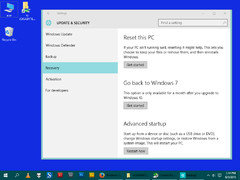
Windows 10 ?
11 years ago
Featured Answer
Sort by:Oldest
Comments (34)
 11 years ago
- 11 years ago
Related Discussions
Find all jpg images and photos that are saved on windows 10 computer
Comments (5)Use a photo organizer - it will rummage through and find all the images, videos and such. then you can often have it move the images to a backup and to a different directory. https://www.itechtics.com/free-photo-organizers-windows-10/...See MoreWindows 10 - and the (rain) Cloud
Comments (2)Here a link I found from doing a Google search with your question that relates to One Drive. You haven't said enough in your question for me to know what agent is acting. You might be able to or previously could have done a more relevant search on your own based on what you're seeing. https://support.office.com/en-us/article/turn-off-disable-or-uninstall-onedrive-f32a17ce-3336-40fe-9c38-6efb09f944b0?ui=en-US&rs=en-US&ad=US...See MoreQuestion about using Gmail while on Google Chrome on Windows 10
Comments (12)Tabs, tabs, tabs! I usually have multiple tabs open, including Gmail. When I open the main forum page here I open all the threads that I want to read in separate tabs and close each one as I finish that thread. If I'm shopping on Amazon, Zappos, etc. I open each item that I want to look at in a separate tab. That makes it easy to go back and forth while I'm comparing them...See MoreWindows 10 Update: is it supposed to be slow upgrading my PC?
Comments (7)I just booted Windows to see if I had an update waiting. The only update I had was for Defender. My last "real" update included a .NET Framework update which required a reboot but I don't remember it being particularly slow. Personally, if it were me, I'd give it a reasonable amount of time (I don't know what reasonable is... an hour or two seems way more than reasonable) and if it was still unresponsive and sitting at the login screen, take it down (hold the power button in) and bring it back up. That's just what I'd do though. :) Edited to add: Try mikie_gw's advice first though. (I'm a slow poster)...See More- 11 years ago
 11 years ago
- 11 years ago
- 11 years ago
 11 years agolast modified: 11 years ago
- 11 years ago
 11 years ago
- 11 years ago
 11 years ago
 11 years agolast modified: 11 years ago
- 11 years agolast modified: 11 years ago
 11 years ago
 11 years ago
- 11 years ago
- 11 years ago
- 11 years ago
 11 years ago
 11 years ago
 11 years ago
- 11 years ago
- 11 years agolast modified: 11 years ago
- 11 years agolast modified: 11 years ago
- 11 years ago
- 11 years agolast modified: 11 years ago
- 11 years ago
- 11 years ago
- 11 years ago
 11 years ago
- 11 years agolast modified: 11 years ago
- 11 years agolast modified: 11 years ago
 11 years ago

Related Stories

WINDOW TREATMENTSThe Art of the Window: 10 Ways to Love Draperies
Consider these ideas for adorning your windows with full-length fabric
Full Story
WINDOWSThe Art of the Window: 10 Ways to Elevate Your Bathroom
These window styles and treatments bring in natural light while creating a restful and rejuvenating ambience
Full Story
MODERN ARCHITECTUREDesign Workshop: 10 Surprising Twists on Window Trim
These modern approaches to window trim include no trim at all. Can you wrap your head around them?
Full Story
MORE ROOMS10 Ideas for a Soothing Sunroom
Big windows, natural light and comfortable seating bring in the outdoors in these inspiring sunrooms
Full Story
WINDOWS10 Ways to Bring In the Breezes
Let nature cool your home with designs that capture fresh air and screen out the sun
Full Story
KITCHEN DESIGN10 Gorgeous Backsplash Alternatives to Subway Tile
Artistic installations, back-painted glass and pivoting windows prove there are backsplash possibilities beyond the platform
Full Story
SMALL KITCHENS10 Things You Didn't Think Would Fit in a Small Kitchen
Don't assume you have to do without those windows, that island, a home office space, your prized collections or an eat-in nook
Full Story
DECORATING GUIDES10 Ways to Embrace a Nook
Find creative uses for those cozy spots next to a window, behind a wall or under the stairs
Full Story
LIGHTING10 Ways to Make Good Use of Winter's Light
Take advantage of the sun we still have with light curtains, window seating and heat-capturing accents
Full Story
Sponsored
DA_Mccoy