Houzz Logo Print
poohbear2767

New tab opens to unwanted search engine

13 years ago
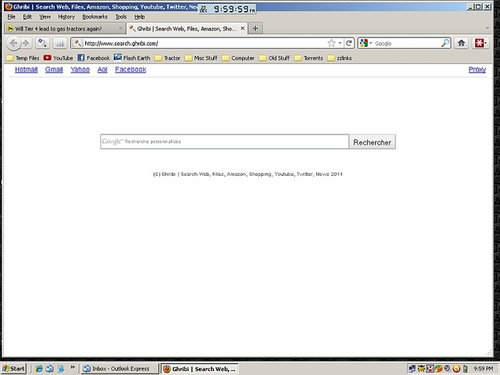
I was reading a tractor forum and opened a new tab to look
up something. Normally it opens to a blank page.
This time it didn't. This time I got this:

I'll start scanning and checking but in the mean time I'm
posting this here for any advice.
What is it and how did it get on here.

Pooh Bear

Windows XP fully updated
FireFox 4.0.1
Avast AV, Spyware Blaster, MBAM, all updated.

Comments (28)

  • 13 years ago
    last modified: 11 years ago

    Ghribi.Search is a hijacker

    Could you run the program below, a box will pop up click on save file, save it to your desk top then double click it.

    Download AdwCleaner http://general-changelog-team.fr/fr/downloads/finish/20-outils-de-xplode/2-adwcleaner
    Link below too for your convenience.

    Double click on AdwCleaner.exe to run the tool.
    ***Note: Windows Vista and Windows 7 users:

    Right click in the adwCleaner.exe and select "run as adminstrator"

    1 Click the Search button.

    2 A logfile will automatically open after the scan has finished.

    3 Please post the content of that logfile in your next reply.

    4 Or you can find the logfile at C:\AdwCleaner[R1].txt.

    Joe

    Here is a link that might be useful: adwcleaner

  • 13 years ago
    last modified: 11 years ago

    Deleting Log Files

    Here is a link that might be useful: AdwCleaner.txt

    This post was edited by poohbear2767 on Fri, Jan 4, 13 at 14:56

  • Related Discussions

    where is the 'new tab ' or 'safety' button?

    Q

    Comments (9)
    Hi ilmbg, They are in IE. Look at the top right of your IE browser. The safety tab should be there. Left click on the safety tab. This should create a drop down box. Within that drop down box, click on In Private Browsing. Should be 2nd choice down. This will bring up a full page that explains In Private Browsing. Also, here is a link that I find very educational! bbbluz Here is a link that might be useful: In Private Browsing Tutorial
    ...See More

    New IE tabs driving me nuts

    Q

    Comments (1)
    Open IE, click on Help>Select IE Help. Do a search with the keyword "tab" (sans quotes). Numerous informative entries will appear including IE FAQs regarding tab browsing. It's #4 on my Vista system. DA
    ...See More

    Can I replace Vista with Windows XP? Search Engines still dead

    Q

    Comments (12)
    Thanks, folks, I'll pass these suggestions on to her. She lives more than 100 miles from the nearest "computer shop" and is trying to fix the problem with her nephew's help. It has them both stumped. Yes, ever since she installed Microsoft.NET framework 2.0, service pack 2 security update for Windows Vista Service pack she can no longer search for anything (using any search engineÂGoogle, Yahoo, Mozilla). An index page will come up but none of the links/sites will open. She canÂt X-out of that screen. She has to hit Alt/ctl/delete and restart task manager; the whole system closes down and she has to log back on. She can open her bookmarks, but canÂt go anywhere from them. She has a Compaq Presario computer. Windows Vista home basic. She has run McAfeeÂs virtual technician and security scans. They said everything was fine. It isnÂt. She has shut down and restarted her computer several times. Nothing seems to work.
    ...See More

    Search Engine

    Q

    Comments (3)
    I do not have any default browsers. They use up a ribbon across the top of my window and most of the time, I want that space for other things. When Bing sneaked in on a software update, I promptly uninstalled it. What I do is keep a list of addresses to popular search engines in my bookmark list. I put them all under one folder and named that folder something I could remember such as "Search Engines". I have a wide screen monitor so I keep the bookmark window open all the time. Anytime I want to search, I'll open a new blank window and click on the URL of the search engine I wish to use. Soon, the connection is made and I can conduct searches without closing my prime job. The search engine screen sits on top of my work window. I can toggle back and forth between the two windows. When I'm done with the search, I close that window. Currently, I have 10 search engines bookmarked. Two of those are my favorites.
    ...See More
  • 13 years ago
    last modified: 11 years ago

    That's why I like to ask for logs. however I don't see Ghribi.Search but lots of other crap mostly www.conduit.com and you don't want that an all the other stuff it adds, so lets,

    Rescan with AdwCleaner.
    Double-click AdwCleaner.exe to run the tool.
    Click Delete. This time.
    Everything that was found will be deleted.
    Save and open files and approve the reboot. A text file will open after the restart.
    Please post the contents of that logfile with your next reply.

  • 13 years ago
    last modified: 11 years ago

    I typed Spyware Blaster, I meant Super AntiSpyware.
    I ran a scan with it and it found 3 critical items.
    I'll re-run the other scan and post the results.

    Thanks.

    Pooh Bear

  • 13 years ago
    last modified: 11 years ago

    Super AntiSpyware found 3 critical, a bunch of tracking cookies,
    and YonToo. I don't remember what YonToo is used for or why
    I allowed it to be installed. I re-ran AdwCleaner and let it
    delete whatever it wanted to and then reboot. Here is the log.
    And a new tab still opens to that search engine.
    ---------------------
    # AdwCleaner v2.103 - Logfile created 12/25/2012 at 23:30:58
    # Updated 25/12/2012 by Xplode
    # Operating system : Microsoft Windows XP Service Pack 3 (32 bits)
    # User : Pooh Bear - POOHS-COMPUTER
    # Boot Mode : Normal
    # Running from : C:\Documents and Settings\Pooh Bear\Desktop\adwcleaner.exe
    # Option [Delete]

    ***** [Services] *****

    ***** [Files / Folders] *****

    File Deleted : C:\WINDOWS\system32\Uninstall.exe
    Folder Deleted : C:\Documents and Settings\All Users\Application Data\Tarma

    Installer
    Folder Deleted : C:\Documents and Settings\Pooh Bear\Application

    Data\Mozilla\Firefox\Profiles\3ajte1di.default\Conduit
    Folder Deleted : C:\Documents and Settings\Pooh Bear\Application

    Data\Mozilla\Firefox\Profiles\3ajte1di.default\extensions\plugin@yontoo.com
    Folder Deleted : C:\Program Files\Yontoo

    ***** [Registry] *****

    Key Deleted : HKCU\Software\Headlight
    Key Deleted :

    HKCU\Software\Microsoft\Windows\CurrentVersion\Ext\Settings\"FD72061E-9FDE-

    484D-A58A-0BAB4151CAD8>
    Key Deleted :

    HKCU\Software\Microsoft\Windows\CurrentVersion\Ext\Stats\"DF7770F7-832F-4BD

    F-B144-100EDDD0C3AE>
    Key Deleted :

    HKCU\Software\Microsoft\Windows\CurrentVersion\Ext\Stats\"FD72061E-9FDE-484

    D-A58A-0BAB4151CAD8>
    Key Deleted :

    HKLM\SOFTWARE\Classes\AppID\"CFDAFE39-20CE-451D-BD45-A37452F39CF0>
    Key Deleted : HKLM\SOFTWARE\Classes\AppID\YontooIEClient.DLL
    Key Deleted :

    HKLM\SOFTWARE\Classes\CLSID\"10DE7085-6A1E-4D41-A7BF-9AF93E351401>
    Key Deleted :

    HKLM\SOFTWARE\Classes\CLSID\"7E84186E-B5DE-4226-8A66-6E49C6B511B4>
    Key Deleted :

    HKLM\SOFTWARE\Classes\CLSID\"80922EE0-8A76-46AE-95D5-BD3C3FE0708D>
    Key Deleted :

    HKLM\SOFTWARE\Classes\CLSID\"99066096-8989-4612-841F-621A01D54AD7>
    Key Deleted :

    HKLM\SOFTWARE\Classes\CLSID\"DF7770F7-832F-4BDF-B144-100EDDD0C3AE>
    Key Deleted :

    HKLM\SOFTWARE\Classes\CLSID\"FD72061E-9FDE-484D-A58A-0BAB4151CAD8>
    Key Deleted :

    HKLM\SOFTWARE\Classes\CLSID\"FE9271F2-6EFD-44B0-A826-84C829536E93>
    Key Deleted :

    HKLM\SOFTWARE\Classes\Interface\"10DE7085-6A1E-4D41-A7BF-9AF93E351401>
    Key Deleted :

    HKLM\SOFTWARE\Classes\Interface\"1AD27395-1659-4DFF-A319-2CFA243861A5>
    Key Deleted :

    HKLM\SOFTWARE\Classes\Interface\"66EEF543-A9AC-4A9D-AA3C-1ED148AC8EEE>
    Key Deleted :

    HKLM\SOFTWARE\Classes\TypeLib\"11549FE4-7C5A-4C17-9FC3-56FC5162A994>
    Key Deleted :

    HKLM\SOFTWARE\Classes\TypeLib\"D372567D-67C1-4B29-B3F0-159B52B3E967>
    Key Deleted : HKLM\SOFTWARE\Classes\YontooIEClient.Api
    Key Deleted : HKLM\SOFTWARE\Classes\YontooIEClient.Api.1
    Key Deleted : HKLM\SOFTWARE\Classes\YontooIEClient.Layers
    Key Deleted : HKLM\SOFTWARE\Classes\YontooIEClient.Layers.1
    Key Deleted : HKLM\Software\Conduit
    Key Deleted :

    HKLM\SOFTWARE\Google\Chrome\Extensions\niapdbllcanepiiimjjndipklodoedlc
    Key Deleted : HKLM\SOFTWARE\Microsoft\Windows\CurrentVersion\App

    Management\ARPCache\"889DF117-14D1-44EE-9F31-C5FB5D47F68B>
    Key Deleted :

    HKLM\SOFTWARE\Microsoft\Windows\CurrentVersion\Explorer\Browser Helper

    Objects\"FD72061E-9FDE-484D-A58A-0BAB4151CAD8>
    Key Deleted :

    HKLM\SOFTWARE\Microsoft\Windows\CurrentVersion\Ext\PreApproved\"DF7770F7-83

    2F-4BDF-B144-100EDDD0C3AE>
    Key Deleted :

    HKLM\SOFTWARE\Microsoft\Windows\CurrentVersion\Uninstall\"889DF117-14D1-44E

    E-9F31-C5FB5D47F68B>
    Key Deleted : HKLM\Software\Tarma Installer

    ***** [Internet Browsers] *****

    -\\ Internet Explorer v8.0.6001.18702

    [OK] Registry is clean.

    -\\ Mozilla Firefox v4.0.1 (en-US)

    File : C:\Documents and Settings\Pooh Bear\Application

    Data\Mozilla\Firefox\Profiles\3ajte1di.default\prefs.js

    C:\Documents and Settings\Pooh Bear\Application

    Data\Mozilla\Firefox\Profiles\3ajte1di.default\user.js ... Deleted !

    Deleted : user_pref("CT2438727.AboutPrivacyUrl",

    "hxxp://www.conduit.com/privacy/Default.aspx";);
    Deleted : user_pref("CT2438727.CTID", "CT2438727");
    Deleted : user_pref("CT2438727.CommunitiesChangesLastCheckTime", "0");
    Deleted : user_pref("CT2438727.CurrentServerDate", "30-4-2010");
    Deleted : user_pref("CT2438727.DialogsAlignMode", "LTR");
    Deleted : user_pref("CT2438727.FirstServerDate", "30-4-2010");
    Deleted : user_pref("CT2438727.FirstTime", true);
    Deleted : user_pref("CT2438727.FirstTimeFF3", true);
    Deleted : user_pref("CT2438727.GroupingInvalidateCache", false);
    Deleted : user_pref("CT2438727.GroupingLastCheckTime", "0");
    Deleted : user_pref("CT2438727.GroupingLastServerUpdateTime", "0");
    Deleted : user_pref("CT2438727.GroupingServerCheckInterval", 1440);
    Deleted : user_pref("CT2438727.GroupingServiceUrl",

    "hxxp://grouping.services.conduit.com/";);
    Deleted : user_pref("CT2438727.Initialize", true);
    Deleted : user_pref("CT2438727.InitializeCommonPrefs", true);
    Deleted : user_pref("CT2438727.InstalledDate", "Thu Apr 29 2010 23:08:23

    GMT-0500 (Central Daylight Time)");
    Deleted : user_pref("CT2438727.InvalidateCache", false);
    Deleted : user_pref("CT2438727.IsGrouping", false);
    Deleted : user_pref("CT2438727.IsMulticommunity", false);
    Deleted : user_pref("CT2438727.IsOpenThankYouPage", true);
    Deleted : user_pref("CT2438727.IsOpenUninstallPage", true);
    Deleted : user_pref("CT2438727.LanguagePackLastCheckTime", "Thu Apr 29 2010

    23:08:23 GMT-0500 (Central Dayligh[...]
    Deleted : user_pref("CT2438727.LanguagePackReloadIntervalMM", 1440);
    Deleted : user_pref("CT2438727.LanguagePackServiceUrl",

    "hxxp://translation.users.conduit.com/Translation.ashx[...]
    Deleted : user_pref("CT2438727.LastLogin_2.5.8.6", "Thu Apr 29 2010

    23:08:36 GMT-0500 (Central Daylight Time)"[...]
    Deleted : user_pref("CT2438727.LatestVersion", "2.1.0.18");
    Deleted : user_pref("CT2438727.Locale", "en");
    Deleted : user_pref("CT2438727.LoginCache", 4);
    Deleted : user_pref("CT2438727.MCDetectTooltipHeight", "83");
    Deleted : user_pref("CT2438727.MCDetectTooltipUrl",

    "hxxp://@EB_INSTALL_LINK@/rank/tooltip/?version=1");
    Deleted : user_pref("CT2438727.MCDetectTooltipWidth", "295");
    Deleted : user_pref("CT2438727.RadioLastCheckTime", "0");
    Deleted : user_pref("CT2438727.RadioLastUpdateIPServer", "0");
    Deleted : user_pref("CT2438727.RadioLastUpdateServer", "0");
    Deleted : user_pref("CT2438727.SHRINK_TOOLBAR", 1);
    Deleted : user_pref("CT2438727.SearchBoxWidth", 156);
    Deleted : user_pref("CT2438727.SearchEngine",

    "Search::hxxp://search.conduit.com/Results.aspx?q=UCM_SEARCH_TER[...]
    Deleted : user_pref("CT2438727.SearchFromAddressBarIsInit", true);
    Deleted : user_pref("CT2438727.SearchFromAddressBarUrl",

    "hxxp://search.conduit.com/ResultsExt.aspx?ctid=CT243[...]
    Deleted : user_pref("CT2438727.SearchInNewTabEnabled", true);
    Deleted : user_pref("CT2438727.SearchInNewTabIntervalMM", 1440);
    Deleted : user_pref("CT2438727.SearchInNewTabLastCheckTime", "Thu Apr 29

    2010 23:08:36 GMT-0500 (Central Dayli[...]
    Deleted : user_pref("CT2438727.SearchInNewTabServiceUrl",

    "hxxp://newtab.conduit-hosting.com/newtab/?ctid=EB_T[...]
    Deleted : user_pref("CT2438727.SearchInNewTabUsageUrl",

    "hxxp://Usage.Hosting.conduit-services.com/UsageServic[...]
    Deleted : user_pref("CT2438727.SettingsCheckIntervalMin", 120);
    Deleted : user_pref("CT2438727.SettingsLastCheckTime", "Thu Apr 29 2010

    23:09:53 GMT-0500 (Central Daylight Ti[...]
    Deleted : user_pref("CT2438727.SettingsLastUpdate", "1272193463");
    Deleted : user_pref("CT2438727.ThirdPartyComponentsInterval", 504);
    Deleted : user_pref("CT2438727.ThirdPartyComponentsLastCheck", "Thu Apr 29

    2010 23:08:20 GMT-0500 (Central Day[...]
    Deleted : user_pref("CT2438727.ThirdPartyComponentsLastUpdate",

    "1269281492");
    Deleted : user_pref("CT2438727.TrusteLinkUrl",

    "hxxp://www.truste.org/pvr.php?page=validate&softwareProgramId=[...]
    Deleted : user_pref("CT2438727.UserID", "UN49699053542409462");
    Deleted : user_pref("CT2438727.ValidationData_Toolbar", 2);
    Deleted : user_pref("CT2438727.alertChannelId", "832836");
    Deleted : user_pref("CT2438727.clientLogIsEnabled", true);
    Deleted : user_pref("CT2438727.clientLogServiceUrl",

    "hxxp://clientlog.users.conduit.com/ClientDiagnostics.asm[...]
    Deleted : user_pref("CT2438727.myStuffEnabled", true);
    Deleted : user_pref("CT2438727.myStuffPublihserMinWidth", 400);
    Deleted : user_pref("CT2438727.myStuffSearchUrl",

    "hxxp://Apps.conduit.com/search?q=SEARCH_TERM&SearchSour[...]
    Deleted : user_pref("CT2438727.myStuffServiceIntervalMM", 1440);
    Deleted : user_pref("CT2438727.myStuffServiceUrl",

    "hxxp://mystuff.conduit-services.com/MyStuffService.ashx?Co[...]
    Deleted : user_pref("CT2438727.uninstallLogServiceUrl",

    "hxxp://uninstall.users.conduit.com/Uninstall.asmx/Reg[...]
    Deleted : user_pref("CommunityToolbar.SearchFromAddressBarSavedUrl",

    "chrome://browser-region/locale/region.pr[...]
    Deleted : user_pref("CommunityToolbar.ToolbarsList", "CT2438727");
    Deleted : user_pref("CommunityToolbar.ToolbarsList2", "CT2438727");
    Deleted : user_pref("CommunityToolbar.alert.alertInfoInterval", 60);
    Deleted : user_pref("CommunityToolbar.alert.alertInfoLastCheckTime", "Fri

    Apr 30 2010 00:09:53 GMT-0500 (Centr[...]
    Deleted : user_pref("CommunityToolbar.alert.clientsServerUrl",

    "hxxp://alert.client.conduit.com");
    Deleted : user_pref("CommunityToolbar.alert.locale", "en");
    Deleted : user_pref("CommunityToolbar.alert.loginIntervalMin", 1440);
    Deleted : user_pref("CommunityToolbar.alert.loginLastCheckTime", "Thu Apr

    29 2010 23:08:20 GMT-0500 (Central D[...]
    Deleted : user_pref("CommunityToolbar.alert.loginLastUpdateTime",

    "1234796400");
    Deleted : user_pref("CommunityToolbar.alert.messageShowTimeSec", 20);
    Deleted : user_pref("CommunityToolbar.alert.servicesServerUrl",

    "hxxp://alert.services.conduit.com");
    Deleted : user_pref("CommunityToolbar.alert.showTrayIcon", false);
    Deleted : user_pref("CommunityToolbar.alert.userCloseIntervalMin", 300);
    Deleted : user_pref("CommunityToolbar.alert.userId",

    ""e97fe779-42f0-4229-84d2-720c858e430b>");

    File : C:\Documents and Settings\Fred\Application

    Data\Mozilla\Firefox\Profiles\jxj04usg.default\prefs.js

    [OK] File is clean.

    -\\ Google Chrome v23.0.1271.97

    File : C:\Documents and Settings\Pooh Bear\Local Settings\Application

    Data\Google\Chrome\User Data\Default\Preferences

    [OK] File is clean.

    *************************

    AdwCleaner[R1].txt - [9866 octets] - [25/12/2012 22:47:10]
    AdwCleaner[R2].txt - [9926 octets] - [25/12/2012 23:24:44]
    AdwCleaner[R3].txt - [9986 octets] - [25/12/2012 23:29:09]
    AdwCleaner[S1].txt - [10259 octets] - [25/12/2012 23:30:58]

    ########## EOF - C:\AdwCleaner[S1].txt - [10320 octets] ##########

  • 13 years ago
    last modified: 11 years ago

    OK. Good work there, Looks like adwCleaner does not have the definition file for Ghribi.Search

    I'm unfamiliar with Ghribi.Search too,

    But while you scanned, I researched, looks like spybot will remove it,

    ************************************************************
    2012-09-26
    Adware that spybot will detect
    ++ Ahnsoft.AnCam + Babylon.Toolbar ++ Win32.BonusCash + Win32.InCore
    Dialer
    ++ Ghribi.Search
    Malware
    ++ AdClicker.cn
    ************************************************************

    Spybot search an Destroy says it will remove it, as listed above, along with other stuff,

    So I'd download that and scan with it, that should get rid of Ghribi.Search for you.

    Joe

    PS Calling it a nite, will check back tomorrow.

    Here is a link that might be useful: Spybot

  • 13 years ago
    last modified: 11 years ago

    Edit,

    You can always check the add remove programs list too, never know sometimes these things get listed there and can be removed that way. Does not hurt to check

    You can run adwCleaner once more this time choose uninstall and remove the program.

    Joe

    This post was edited by zep516 on Wed, Dec 26, 12 at 0:56

  • 13 years ago

    PB,

    If you decide to use Spyboy S&D on your XP system consider using the prior version of v1.6.2 rather than v2. There have been reports of problems with the current version particularly on older systems. In fact, on the bottom of Z's linked page v1.6.2 is identified as "Still available for older PCs". The current definitions are right below it.

    Though v2 is suitable for Vista I still have the older version on this system and I have had no operational concerns.

    DA

  • 13 years ago
    last modified: 11 years ago

    I ran v2 and it took all night and then some.
    Still didn't clean it. I will try v1.6.2
    Maybe I should run from safe mode?

    Pooh Bear

  • 13 years ago
    last modified: 11 years ago

    OK. Try that. Do you have Hijackthis installed? Like to see a scan.

    Also,

    Open Firefox got to Tools at the top.
    Click Addons see if Ghribi Search is there, not there
    Then click Extensions
    See if is in there.
    If so click Remove
    Then a reboot.

    If it wasn't in Extensions then click [b]PlugIns[/b] and see if it is in there.

    Let me know how this works.

  • 13 years ago
    last modified: 11 years ago

    MBAM scan came up clean. SAS scan came up clean.
    Spybot scan came up clean, both versions.
    Nothing found in add/remove programs.
    Nothing found in extensions or plug ins for Firefox.
    Now to run Hijack This to see what it finds.

    Pooh Bear

  • 13 years ago
    last modified: 11 years ago

    Post the log report please.

  • 13 years ago
    last modified: 11 years ago

    Logfile of Trend Micro HijackThis v2.0.4
    Scan saved at 10:08:13 PM, on 12/26/2012
    Platform: Windows XP SP3 (WinNT 5.01.2600)
    MSIE: Internet Explorer v8.00 (8.00.6001.18702)
    Boot mode: Normal

    Running processes:
    C:\WINDOWS\System32\smss.exe
    C:\WINDOWS\system32\winlogon.exe
    C:\WINDOWS\system32\services.exe
    C:\WINDOWS\system32\lsass.exe
    C:\WINDOWS\system32\svchost.exe
    C:\WINDOWS\System32\svchost.exe
    C:\Program Files\AVAST Software\Avast\AvastSvc.exe
    C:\WINDOWS\Explorer.EXE
    C:\WINDOWS\system32\spoolsv.exe
    C:\Program Files\Common Files\logishrd\LVMVFM\UMVPFSrv.exe
    C:\Program Files\SUPERAntiSpyware\SASCORE.EXE
    C:\Program Files\Box Sync\UpdateService.exe
    C:\WINDOWS\BCMSMMSG.exe
    C:\Program Files\AVAST Software\Avast\avastUI.exe
    C:\Program Files\Helexis\Drive Health\dhcore.exe
    C:\Program Files\PC Tools Firewall Plus\FirewallGUI.exe
    C:\Program Files\Malwarebytes' Anti-Malware\mbamscheduler.exe
    C:\Program Files\Chameleon Clock\ChamClock.exe
    C:\WINDOWS\system32\ctfmon.exe
    C:\Program Files\SUPERAntiSpyware\SUPERAntiSpyware.exe
    C:\Program Files\Malwarebytes' Anti-Malware\mbamservice.exe
    C:\Program Files\YAC\yac.exe
    C:\Program Files\Malwarebytes' Anti-Malware\mbamgui.exe
    C:\Program Files\PC Tools Firewall Plus\FWService.exe
    C:\Documents and Settings\All Users\Application Data\Skype\Toolbars\Skype C2C Service\c2c_service.exe
    C:\Program Files\IDT\6232008232231\STacSV.exe
    C:\WINDOWS\system32\svchost.exe
    C:\WINDOWS\system32\SearchIndexer.exe
    C:\Program Files\Outlook Express\msimn.exe
    C:\Program Files\RealNetworks\RealDownloader\rndlresolversvc.exe
    c:\program files\real\realplayer\update\realsched.exe
    C:\Program Files\Trend Micro\HiJackThis\HiJackThis.exe

    R1 - HKLM\Software\Microsoft\Internet Explorer\Main,Default_Page_URL = http://go.microsoft.com/fwlink/?LinkId=69157
    R1 - HKLM\Software\Microsoft\Internet Explorer\Main,Default_Search_URL = http://go.microsoft.com/fwlink/?LinkId=54896
    R1 - HKLM\Software\Microsoft\Internet Explorer\Main,Search Page = http://go.microsoft.com/fwlink/?LinkId=54896
    R0 - HKLM\Software\Microsoft\Internet Explorer\Main,Start Page = http://go.microsoft.com/fwlink/?LinkId=69157
    R1 - HKCU\Software\Microsoft\Windows\CurrentVersion\Internet Settings,ProxyServer = http=;ftp=;https=;
    O2 - BHO: RealNetworks Download and Record Plugin for Internet Explorer - (3049C3E9-B461-4BC5-8870-4C09146192CA) - C:\Documents and Settings\All Users\Application Data\RealNetworks\RealDownloader\BrowserPlugins\IE\rndlbrowserrecordplugin.dll
    O2 - BHO: WsftpBrowserHelper Class - (601ED020-FB6C-11D3-87D8-0050DA59922B) - C:\Program Files\WS_FTP Pro\wsbho2k0.dll
    O2 - BHO: RoboForm - (724d43a9-0d85-11d4-9908-00400523e39a) - C:\Program Files\Siber Systems\AI RoboForm\roboform.dll
    O2 - BHO: Groove GFS Browser Helper - (72853161-30C5-4D22-B7F9-0BBC1D38A37E) - C:\PROGRA~1\MICROS~2\Office12\GRA8E1~1.DLL
    O2 - BHO: avast! WebRep - (8E5E2654-AD2D-48bf-AC2D-D17F00898D06) - C:\Program Files\AVAST Software\Avast\aswWebRepIE.dll
    O2 - BHO: LastPass Vault - (95D9ECF5-2A4D-4550-BE49-70D42F71296E) - C:\Program Files\LastPass\LPToolbar.dll
    O2 - BHO: IeCatch2 Class - (A5366673-E8CA-11D3-9CD9-0090271D075B) - C:\PROGRA~1\FlashGet\jccatch.dll
    O2 - BHO: SkypeIEPluginBHO - (AE805869-2E5C-4ED4-8F7B-F1F7851A4497) - C:\Program Files\Skype\Toolbars\Internet Explorer\skypeieplugin.dll
    O2 - BHO: WOT Helper - (C920E44A-7F78-4E64-BDD7-A57026E7FEB7) - C:\Program Files\WOT\WOT.dll
    O3 - Toolbar: FlashGet Bar - (E0E899AB-F487-11D5-8D29-0050BA6940E3) - C:\PROGRA~1\FlashGet\fgiebar.dll
    O3 - Toolbar: &RoboForm - (724d43a0-0d85-11d4-9908-00400523e39a) - C:\Program Files\Siber Systems\AI RoboForm\roboform.dll
    O3 - Toolbar: WOT - (71576546-354D-41c9-AAE8-31F2EC22BF0D) - C:\Program Files\WOT\WOT.dll
    O3 - Toolbar: avast! WebRep - (8E5E2654-AD2D-48bf-AC2D-D17F00898D06) - C:\Program Files\AVAST Software\Avast\aswWebRepIE.dll
    O3 - Toolbar: LastPass Toolbar - (9f6b5cc3-5c7b-4b5c-97af-19dec1e380e5) - C:\Program Files\LastPass\LPToolbar.dll
    O4 - HKLM\..\Run: [BCMSMMSG] BCMSMMSG.exe
    O4 - HKLM\..\Run: [SysTrayApp] %ProgramFiles%\IDT\WDM\sttray.exe
    O4 - HKLM\..\Run: [avast] "C:\Program Files\AVAST Software\Avast\avastUI.exe" /nogui
    O4 - HKLM\..\Run: [00PCTFW] "C:\Program Files\PC Tools Firewall Plus\FirewallGUI.exe" -s
    O4 - HKLM\..\Run: [APSDaemon] "C:\Program Files\Common Files\Apple\Apple Application Support\APSDaemon.exe"
    O4 - HKLM\..\Run: [QuickTime Task] "C:\Program Files\QuickTime\QTTask.exe" -atboottime
    O4 - HKLM\..\Run: [TkBellExe] "c:\program files\real\realplayer\update\realsched.exe" -osboot
    O4 - HKCU\..\Run: [HomeAlarm] C:\Program Files\Chameleon Clock\ChamClock.exe
    O4 - HKCU\..\Run: [ctfmon.exe] C:\WINDOWS\system32\ctfmon.exe
    O4 - HKCU\..\Run: [SUPERAntiSpyware] C:\Program Files\SUPERAntiSpyware\SUPERAntiSpyware.exe
    O4 - Startup: yac.lnk = C:\Program Files\YAC\yac.exe
    O8 - Extra context menu item: Customize Menu - file://C:\Program Files\Siber Systems\AI RoboForm\RoboFormComCustomizeIEMenu.html
    O8 - Extra context menu item: Download All by FlashGet - C:\Program Files\FlashGet\jc_all.htm
    O8 - Extra context menu item: Download using FlashGet - C:\Program Files\FlashGet\jc_link.htm
    O8 - Extra context menu item: Download with Xilisoft Download YouTube Video - C:\Program Files\Xilisoft\Download YouTube Video\upod_link.HTM
    O8 - Extra context menu item: E&xport to Microsoft Excel - res://C:\PROGRA~1\MICROS~2\Office12\EXCEL.EXE/3000
    O8 - Extra context menu item: En&queue current page with BID - file://C:\Program Files\Bulk Image Downloader\iemenu\iebidqueue.htm
    O8 - Extra context menu item: Enqueue link tar&get with BID - file://C:\Program Files\Bulk Image Downloader\iemenu\iebidlinkqueue.htm
    O8 - Extra context menu item: LastPass - file://C:\Documents and Settings\Pooh Bear\Local Settings\Application Data\LastPass\context.html?cmd=lastpass
    O8 - Extra context menu item: LastPass Fill Forms - file://C:\Documents and Settings\Pooh Bear\Local Settings\Application Data\LastPass\context.html?cmd=fillforms
    O8 - Extra context menu item: Open &link target with BID - file://C:\Program Files\Bulk Image Downloader\iemenu\iebidlink.htm
    O8 - Extra context menu item: Open current page with BI&D - file://C:\Program Files\Bulk Image Downloader\iemenu\iebid.htm
    O8 - Extra context menu item: Open current page with BID Link Explorer - file://C:\Program Files\Bulk Image Downloader\iemenu\iebidlinkexplorer.htm
    O8 - Extra context menu item: RoboForm Toolbar - file://C:\Program Files\Siber Systems\AI RoboForm\RoboFormComShowToolbar.html
    O8 - Extra context menu item: Save Forms - file://C:\Program Files\Siber Systems\AI RoboForm\RoboFormComSavePass.html
    O9 - Extra button: Send to OneNote - (2670000A-7350-4f3c-8081-5663EE0C6C49) - C:\PROGRA~1\MICROS~2\Office12\ONBttnIE.dll
    O9 - Extra 'Tools' menuitem: S&end to OneNote - (2670000A-7350-4f3c-8081-5663EE0C6C49) - C:\PROGRA~1\MICROS~2\Office12\ONBttnIE.dll
    O9 - Extra button: Fill Forms - (320AF880-6646-11D3-ABEE-C5DBF3571F46) - file://C:\Program Files\Siber Systems\AI RoboForm\RoboFormComFillForms.html
    O9 - Extra 'Tools' menuitem: Fill Forms - (320AF880-6646-11D3-ABEE-C5DBF3571F46) - file://C:\Program Files\Siber Systems\AI RoboForm\RoboFormComFillForms.html
    O9 - Extra button: Save - (320AF880-6646-11D3-ABEE-C5DBF3571F49) - file://C:\Program Files\Siber Systems\AI RoboForm\RoboFormComSavePass.html
    O9 - Extra 'Tools' menuitem: Save Forms - (320AF880-6646-11D3-ABEE-C5DBF3571F49) - file://C:\Program Files\Siber Systems\AI RoboForm\RoboFormComSavePass.html
    O9 - Extra button: LastPass - (43699cd0-e34f-11de-8a39-0800200c9a66) - C:\Program Files\LastPass\LPToolbar.dll
    O9 - Extra 'Tools' menuitem: LastPass - (43699cd0-e34f-11de-8a39-0800200c9a66) - C:\Program Files\LastPass\LPToolbar.dll
    O9 - Extra button: RoboForm - (724d43aa-0d85-11d4-9908-00400523e39a) - file://C:\Program Files\Siber Systems\AI RoboForm\RoboFormComShowToolbar.html
    O9 - Extra 'Tools' menuitem: RoboForm Toolbar - (724d43aa-0d85-11d4-9908-00400523e39a) - file://C:\Program Files\Siber Systems\AI RoboForm\RoboFormComShowToolbar.html
    O9 - Extra button: Skype Click to Call - (898EA8C8-E7FF-479B-8935-AEC46303B9E5) - C:\Program Files\Skype\Toolbars\Internet Explorer\skypeieplugin.dll
    O9 - Extra button: Research - (92780B25-18CC-41C8-B9BE-3C9C571A8263) - C:\PROGRA~1\MICROS~2\Office12\REFIEBAR.DLL
    O9 - Extra button: FlashGet - (D6E814A0-E0C5-11d4-8D29-0050BA6940E3) - C:\PROGRA~1\FlashGet\flashget.exe
    O9 - Extra 'Tools' menuitem: &FlashGet - (D6E814A0-E0C5-11d4-8D29-0050BA6940E3) - C:\PROGRA~1\FlashGet\flashget.exe
    O9 - Extra button: (no name) - (e2e2dd38-d088-4134-82b7-f2ba38496583) - C:\WINDOWS\Network Diagnostic\xpnetdiag.exe
    O9 - Extra 'Tools' menuitem: @xpsp3res.dll,-20001 - (e2e2dd38-d088-4134-82b7-f2ba38496583) - C:\WINDOWS\Network Diagnostic\xpnetdiag.exe
    O9 - Extra button: Messenger - (FB5F1910-F110-11d2-BB9E-00C04F795683) - C:\Program Files\Messenger\msmsgs.exe
    O9 - Extra 'Tools' menuitem: Windows Messenger - (FB5F1910-F110-11d2-BB9E-00C04F795683) - C:\Program Files\Messenger\msmsgs.exe
    O16 - DPF: (0CCA191D-13A6-4E29-B746-314DEE697D83) (Facebook Photo Uploader 5 Control) - http://upload.facebook.com/controls/2008.10.10_v5.5.8/FacebookPhotoUploader5.cab
    O16 - DPF: (6414512B-B978-451D-A0D8-FCFDF33E833C) (WUWebControl Class) - http://www.update.microsoft.com/windowsupdate/v6/V5Controls/en/x86/client/wuweb_site.cab?1340491766312
    O16 - DPF: (E2883E8F-472F-4FB0-9522-AC9BF37916A7) - http://platformdl.adobe.com/NOS/getPlusPlus/1.6/gp.cab
    O17 - HKLM\System\CCS\Services\Tcpip\..\(576832FE-4FF2-4F0B-8998-E4D708AF0796): NameServer = 66.11.240.152,8.8.8.8
    O17 - HKLM\System\CCS\Services\Tcpip\..\(6052BCAC-6511-48B8-876B-A947AF0B6DE8): NameServer = 206.74.254.2,204.116.57.2
    O18 - Protocol: grooveLocalGWS - (88FED34C-F0CA-4636-A375-3CB6248B04CD) - C:\PROGRA~1\MICROS~2\Office12\GR99D3~1.DLL
    O18 - Protocol: skype-ie-addon-data - (91774881-D725-4E58-B298-07617B9B86A8) - C:\Program Files\Skype\Toolbars\Internet Explorer\skypeieplugin.dll
    O18 - Protocol: skype4com - (FFC8B962-9B40-4DFF-9458-1830C7DD7F5D) - C:\PROGRA~1\COMMON~1\Skype\SKYPE4~1.DLL
    O18 - Protocol: wot - (C2A44D6B-CB9F-4663-88A6-DF2F26E4D952) - C:\Program Files\WOT\WOT.dll
    O22 - SharedTaskScheduler: Browseui preloader - (438755C2-A8BA-11D1-B96B-00A0C90312E1) - C:\WINDOWS\system32\browseui.dll
    O22 - SharedTaskScheduler: Component Categories cache daemon - (8C7461EF-2B13-11d2-BE35-3078302C2030) - C:\WINDOWS\system32\browseui.dll
    O23 - Service: SAS Core Service (!SASCORE) - SUPERAntiSpyware.com - C:\Program Files\SUPERAntiSpyware\SASCORE.EXE
    O23 - Service: Box Sync Auto-updater (#UpdateService) - Box, Inc. - C:\Program Files\Box Sync\UpdateService.exe
    O23 - Service: Adobe Flash Player Update Service (AdobeFlashPlayerUpdateSvc) - Adobe Systems Incorporated - C:\WINDOWS\system32\Macromed\Flash\FlashPlayerUpdateService.exe
    O23 - Service: Autodesk Licensing Service - Autodesk - C:\Program Files\Common Files\Autodesk Shared\Service\AdskScSrv.exe
    O23 - Service: avast! Antivirus - AVAST Software - C:\Program Files\AVAST Software\Avast\AvastSvc.exe
    O23 - Service: DriveHealth - Helexis Software Development - C:\Program Files\Helexis\Drive Health\dhcore.exe
    O23 - Service: Google Update Service (gupdate) (gupdate) - Google Inc. - C:\Program Files\Google\Update\GoogleUpdate.exe
    O23 - Service: Google Update Service (gupdatem) (gupdatem) - Google Inc. - C:\Program Files\Google\Update\GoogleUpdate.exe
    O23 - Service: Macromedia Licensing Service - Unknown owner - C:\Program Files\Common Files\Macromedia Shared\Service\Macromedia Licensing.exe
    O23 - Service: MBAMScheduler - Malwarebytes Corporation - C:\Program Files\Malwarebytes' Anti-Malware\mbamscheduler.exe
    O23 - Service: MBAMService - Malwarebytes Corporation - C:\Program Files\Malwarebytes' Anti-Malware\mbamservice.exe
    O23 - Service: NBService - Nero AG - C:\Program Files\Nero\Nero 7\Nero BackItUp\NBService.exe
    O23 - Service: NMIndexingService - Nero AG - C:\Program Files\Common Files\Ahead\Lib\NMIndexingService.exe
    O23 - Service: NVIDIA Display Driver Service (NVSvc) - NVIDIA Corporation - C:\WINDOWS\system32\nvsvc32.exe
    O23 - Service: PC Tools Firewall Plus (PCToolsFirewallPlus) - Unknown owner - C:\Program Files\PC Tools Firewall Plus\FWService.exe
    O23 - Service: RealNetworks Downloader Resolver Service - Unknown owner - C:\Program Files\RealNetworks\RealDownloader\rndlresolversvc.exe
    O23 - Service: Remote Packet Capture Protocol v.0 (experimental) (rpcapd) - CACE Technologies, Inc. - C:\Program Files\WinPcap\rpcapd.exe
    O23 - Service: Skype C2C Service - Skype Technologies S.A. - C:\Documents and Settings\All Users\Application Data\Skype\Toolbars\Skype C2C Service\c2c_service.exe
    O23 - Service: Skype Updater (SkypeUpdate) - Skype Technologies - C:\Program Files\Skype\Updater\Updater.exe
    O23 - Service: Audio Service (STacSV) - IDT, Inc. - C:\Program Files\IDT\6232008232231\STacSV.exe
    O23 - Service: TiVo Beacon (TivoBeacon2) - TiVo Inc. - C:\Program Files\Common Files\TiVo Shared\Beacon\TiVoBeacon.exe
    O23 - Service: UMVPFSrv - Logitech Inc. - C:\Program Files\Common Files\logishrd\LVMVFM\UMVPFSrv.exe

    --
    End of file - 13208 bytes

  • 13 years ago
    last modified: 11 years ago

    Nothing there. Up in the browser click the small down arrow next to the Google Icon in the Google search box, does Ghribi show there?

  • 13 years ago
    last modified: 11 years ago

    I opened a new tab to check and got this:

    Resource Limit Is Reached
    The website is temporarily unable to service your request as it exceeded resource limit.
    Please try again later.

    I clicked Home and it takes me to my home page (google) and
    then I clicked the down arrow. ghribi wasn't listed.

    Pooh Bear

  • 13 years ago
    last modified: 11 years ago

    This is a big scan, I usually don't do it here the results maybe to big for the forum. The scan itself only takes 5mins, see if you can do it.

    Download OTL to your desktop. See link below.
    Double click on the icon to run it. Make sure all other windows are closed to let it run uninterrupted.
    When the window appears, underneath Output at the top change it to Minimal Output.
    Under the Standard Registrybox change it to All.
    Check the boxes beside LOP Check and Purity Check.
    Click the Run Scan button. Do not change any settings unless otherwise told to do so. The scan wont take long.
    When the scan completes, it will open two notepad windows. OTL.Txt and Extras.Txt. These are saved in the same location as OTL.
    Please copy(Edit->Select All, Edit->Copy) the contents of these files, one at a time, and post it with your next reply.

    Here is a link that might be useful: OTL

  • 13 years ago
    last modified: 11 years ago

    If the scan will not post to the forum because it's 2 big, the only other thing I could suggest is to try reinstalling Firefox, from what I see you're using version 4 for whatever reason, the link is below

    Here is a link that might be useful: oldapps.com/firefox

    This post was edited by zep516 on Thu, Dec 27, 12 at 1:20

  • 13 years ago
    last modified: 11 years ago

    A HouseCall scan came up clean.

    Here is a screen shot of the settings I used for OTL.
    This is after running a scan. The scan results are linked below.

    OTL.txt

    Extras.txt

    This post was edited by poohbear2767 on Thu, Dec 27, 12 at 1:01

  • 13 years ago
    last modified: 11 years ago

    Do you know what this is:
    FF - prefs.js..extensions.enabledAddons: download_YouTube_ghribi@gmail.com:1.0.0

    That's what I see from a quick look in the OTL.TXT Log under the FF(Firefox)settings.

    Tomorrow we can delete it, I'm just not 100 % what it is, and I need to sign off for now. But I can prepare a few deletions and include that, and also take a closer look at other lines in the log.

    Thank you for posting those logs like that.

    This post was edited by zep516 on Thu, Dec 27, 12 at 1:21

  • 13 years ago
    last modified: 11 years ago

    1 Click YouTube Video Download.
    I removed that from add-ons and it fixed the problem.

    Thank you so much for your help with this.
    Really, I can't thank you enough.

    ~One VERY grateful Pooh Bear

  • 13 years ago
    last modified: 11 years ago

    That is very helpful to know that it is coming along for the ride with that add on. I felt sure it was one of the notorious redirects tdss variants at first.
    I have never seen this one either Joe.

    Learn something new every day LOL

    good work to you too Pooh

  • 13 years ago
    last modified: 11 years ago

    I have now updated to FireFox 12.0 and
    Easy YouTube Video Downloader 6.6

    Again, thanks for the help.

    Pooh Bear

  • 13 years ago
    last modified: 11 years ago

    Glad you beat up on your bad guy.

    Curious though, why did you not go to current version of firefox - think its 17.01 last I knew.

  • 13 years ago
    last modified: 11 years ago

    Didn't the latest version of FF have a security flaw?
    I only hit the update (Help>>About FF>>Check For Updates) once.
    It updated to v12. I'll do it again and see what I get.

    Edit - Ok, now I'm at v17.0.1 after another update.

    Pooh Bear

    This post was edited by poohbear2767 on Thu, Dec 27, 12 at 21:52

  • 13 years ago
    last modified: 11 years ago

    poohbear please follow up, for additional clean up measures.

    note
    Drive C: : 232.88 Gb Total Space : 44.83 Gb Free Space : 19.25% Space Free : Partition Type: NTFS

    You're running out of free space! Windows needs 20% or more to run efficently.

    Please run OTL again. Under the Custom Scans/Fixes box at the bottom paste in the following text between the stars
    *********************************************************

    :otl
    FF - prefs.js..extensions.enabledAddons: download_YouTube_ghribi@gmail.com:1.0.0
    @Alternate Data Stream - 182 bytes -> C:\Documents and Settings\All Users\Application Data\TEMP:408F95E5
    @Alternate Data Stream - 122 bytes -> C:\Documents and Settings\All Users\Application Data\TEMP:C8B8CEBD
    @Alternate Data Stream - 121 bytes -> C:\Documents and Settings\All Users\Application Data\TEMP:C31F31E6

    :Files
    ipconfig /flushdns /c

    :commands
    [CreateRestorePoint]
    [emptytemp]
    [purity]

    ************************************************************
    Then click the Run Fix button at the top
    Let the program run unhindered, reboot the PC when it is done
    Open OTL again and click the Quick Scan button. Post the log it produces in your next reply.

    Post that directly to the forum.

  • 13 years ago
    last modified: 11 years ago

    My hard drive is full because I recently did a bulk download
    of You Tube files. Normally I keep everything nice and tidy.
    I do need to burn some stuff off to data DVDs.

    I ran the scan. Twice. Both times I pasted that into the
    window and clicked Run Fix. It seemed to freeze up both times.
    I did a hard reset both times after about an hour.
    All it ever said was "Ending Processes - DO NOT INTERRUPT."
    How long should this take. I will let it run overnight tonight.
    Or I may tried it from Safe Mode to lessen the processes.

    Pooh Bear

  • 13 years ago
    last modified: 11 years ago

    Sorry it took so long to get back to this. I went into the hospital right after I posted. I just now got home and I really don't feel like dealing with this at the moment.
    Thank you for your help.

    Pooh Bear

    This post was edited by poohbear2767 on Fri, Jan 4, 13 at 14:55

  • 13 years ago
    last modified: 11 years ago

    Hi,
    poohbear2767

    Can you edit that and delete the log now, I don't want it here, sorry about that.

Sponsored