Houzz Logo Print
joy_ca

Smudge Painting.......

20 years ago

I have been learning 'Smudge' painting.....Joy

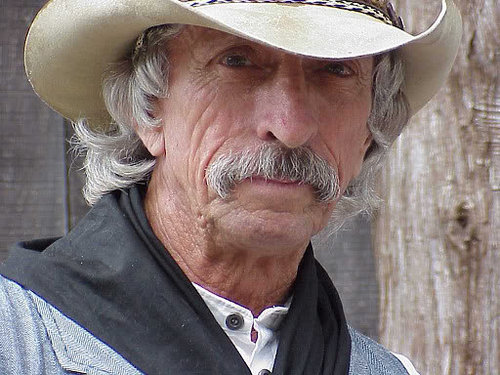
Small version of the Original...

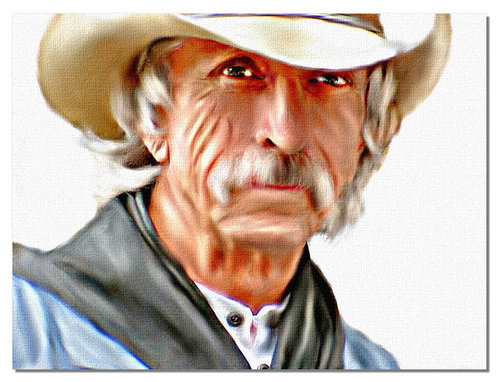
Smudged version....

Comments (29)

  • 20 years ago

    Wow!! I love this, do you have a link for the tut Joy?

    Thanks ;0)

  • 20 years ago

    Zipper, thank you.

    I'm sorry there is, no tutorial. It's sort of trial and error. I can get you started with a few suggestions.

    First, after, I make all color corrections....
    I use the Dodge/Burn tool (fairly low opacity), play with settings...this will exaggerate the light and dark areas.

    Start and finish the background first (I removed it for this one) you can smudge it to make it less detailed.

    Now, use the Smudge tool (Default brush)....
    Settings....Size varies > Hardness (varies a little under 50%)> Step 5 > Density 100 % > Opacity will vary from about 40% to about 60%....if, it grabs too much and smears, lower the Opacity. Use a short scrubbing notion (like you were scrubbing the sink or a pan) following the direction of the lines.

    Some times, I use the Push tool, too. It helps for making corrections, you can push an area to make to show more, or, show less.

    Leave hair until last....I have a Hairbrush, brush, that I use for hair.

    Start with something simple, like a very plain flower, until you get the feel of the tools.

    The very last is adding the texture (or not), some times its better with no texture, it depends on the image.

    Hope this helps....I'll help all I can.

    I will post three examples (next post), to give you the idea.

    Joy

  • 20 years ago

    Three examples of my first Smudges....

    BEFORE

    AFTER

    BEFORE

    AFTER

    BEFORE

    After

  • 20 years ago

    Those are fantastic..Joy...Is that a photo of you? what a beauty...Great work...
    Bev

  • 20 years ago

    Bev, thank you. No, it's not me (darn), I don't know who it is.

    Zipper, I forgot to tell you to work on a large image (zoom in), resize later.

    Joy

  • 20 years ago

    Oh Joy,
    Those are absolutely terrific!
    I can't get over the top one. Love it.

    ~Urlee~

  • 20 years ago

    Holy cow!! Those are great Joy.
    Judy

  • 20 years ago

    Thank you Joy! I'll give this a try in a little while. ;0)

  • 20 years ago

    OMG, Joy, I can't believe the difference! Simply amazing!

  • 20 years ago

    Thank you, Urlee, Judy & Gale....give it a try.

    Joy

  • 20 years ago

    Hopefully THIS SITE will come up for you which I found interesting Smudgework.
    I sure wish I could turn out a product like that cowpoke one Joy did.
    Am getting the urge to try but first have to locate the Smudge Tool? "LOL"

    ~Urlee~

  • 20 years ago

    WOW
    Can't believe I've only just seen these incredible pictures.
    Amazing work Joy.
    Urlee thanks for the link - very interesting and helpful stuff there. LOL now I just need to add a few more hours to the day so I have time to play.
    HUGS
    Sue :)

  • 20 years ago

    Good evening Sue, You are welcome.
    I think I misinterpreted smudge with the cowpoke results.
    Joy did you use the canvas tecture effect to make it look that way? If so, what settings?

    ~Urlee~

  • 20 years ago

    Urlee, I'm a regular on that forum.

    I can't post some of them here, they are copyrighted. Open the first two challenges in the index list.....I'm in most of them.

    I just finished one called "Girl from the Past", would like you to see it. When you open a challenge, the first photo in the post is the 'before', then we all work on the photo and show what we have done.

    Thanks to all, for the kind words,
    Joy

    Here is a link that might be useful: Innographx Index

  • 20 years ago

    Joy,
    Well I'll be darned!
    I hit the jackpot? "lol"
    That URL I posted came from Google when I searched for smudge.
    I didn't look at the posts to see who all did what, just the smudge one for instructions.
    Went back now and found you and also the "cowpoke". Amazing.

    ~Urlee~

  • 20 years ago

    Urlee, most the people on that forum use PhotoShop. When we finish a photo, we are supposed to give an idea of how we did it. It makes it hard when there is something that I like and want to try.

    Bragging....
    You will find me listed the the Innographx "Hall of Fame" :-) Honestly, I'm not always sure why.

    August-September 2005 (1)
    June-July 2005 (5)
    April-May 2005 (1)
    February-March 2005 (1)
    December-January 2004-05 (2)
    October-November 2004 (2)
    August-September 2004 (1)
    June/July 2004 (2)

    Joy

    Here is a link that might be useful: Hall of Fame

  • 20 years ago

    Joy, that is so interesting and also beautiful. Thanks for the link, Urlee. I have to make a list of all these things I have to try after the summer.
    Carol

  • 20 years ago

    Carol, You are welcome.
    You got your work cut out for you. :)

    Joy,
    Bragging....
    You will find me listed the the Innographx "Hall of Fame" :-) Honestly, I'm not always sure why.

    You mean you can figure out the HARD stuff of tutorials and can't figure out that? When the answer is sooooo simple? Gorgeous work!
    Can't help but fall in love with Blonde Bombshell & Victoria.
    Great "Smudgework" one too!
    Thanks for sharing your talent.

    ~Urlee~

  • 20 years ago

    Joy, thanks again for the instructions. I worked on a pic of my poodle, and let me tell you that's NOT the subject to start with lol. I've just been to the index site and looked at some of your work, beautiful, just beautiful. When I grow up I want to be an artist like you. ;0)

  • 20 years ago

    Zipper, that's why, I suggested you start with a simple flower....the poodle will come a little later :-) I'm so glad you are trying.....please, post something, I will look at it and help you.....or, send it to me in an email.

    Flood fill a new image and with color (or pattern) and play with the different brushes. Try Push/Smudge/Dodge and Burn brushes. You will get a feel for the brush size and opacity.

    Urlee, thank you, for all those very nice compliments :-) Now, jump in and give it a try.

    Joy

  • 20 years ago

    Ok Joy, I'm getting my 'supplies' ready to work on something using this technique this week-end. I've just one WEE problem. Where in the world are the push/smudge/dodge & burn brushes? You think I might need them? Thought so. :)

  • 20 years ago

    Gale,
    I don't think PSP7 has them but in PSP8, they are here:

    {{!gwi}}

    ~Urlee~

  • 20 years ago

    Joy -
    I'm also wondering if you used the "canvas texture" on the cow poke. Not that I intend to even try this technique. I'm still working on the easy stuff (easy to you). However, I do love the texture on the cowpoke and both Urlee and I wondered what you did. It sure looks like a canvas painting - every one of them is remarkable though.
    Elaine

  • 20 years ago

    Elaine, the texture is the very last thing, I do.
    I used a plugin called Texturizer (canvas).
    The PSP texture, it works fine, too.

    Gale, Gale, Gale, learn where your tools are, it takes a lot of time to find them each time you have to change.

    If anyone has a picture that they want me to try (no promises), send it to me (as large a file as possible). I will give it a try and post what I did.

    Joy

  • 20 years ago

    Just finished a portrait of Tom Selleck.....Joy

    Smudged

  • 20 years ago

    Oh my Joy,
    We both picked him for our "dream project" but I didn't get to experiment yet!
    That is great!
    Here is the one I had intended on using, if ever!
    Wouldn't it make a good one?
    I made it smaller for here but have a size 1127x1473 to work with as you said the larger the better?
    {{!gwi}}

    ~Urlee~

  • 20 years ago

    Tks for the 'tool find', Urlee. :)

    Oh my! Tom Selleck... Yummmmmy! Great job, Joy. Urlee, Tom the Cowboy would make a wunnerful smudge. Heck he's mega fine just like he is, doncha think? :)

  • 20 years ago

    Urlee, love that one. You may be a little ambitious to start with that one, it really has a lot of detail, but, go for it.

    Some people start with a small image and then resize up, I start with a large image and resize down....what ever works for you. I try to end up with a finished image that is close to 800 pixels on the longest side....Resolution 72.000 and optimized to around 115 kb (more or less). I don't want the file to be too big, it takes too long to load.

    Joy

  • 20 years ago

    He is so FINE......wow - good luck if you can improve on what God gave that man.

    Elaine

Sponsored
High Point Cabinets
Average rating: 5 out of 5 stars21 Reviews
Columbus' Experienced Custom Cabinet Builder | 4x Best of Houzz Winner