

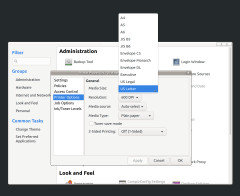
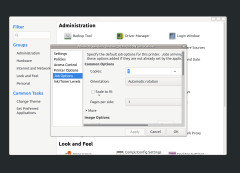
Need help with my printer HP eny 5000
5 years ago
Featured Answer
Sort by:Oldest
Comments (6)
 5 years ago
Related Discussions
Battery for GT5000 (Kohler 25HP)
Comments (10)Lawn and Garden tractor batteries usually come in 4 different ratings - all in the same sized battery case. Ratings are approximate. 180 cold cranking amps 230 cold cranking amps 300 cold cranking amps 340 cold cranking amps Batteries that are vented through removable battery caps are likely to develop corrosion on the battery terminals. The sealed batteries are vented differently and do not develop the corrosion on battery terminals. Sealed batteries are usually higher priced than the batteries with the removable caps. With the larger engines such as your 25 hp Kohler, the 300 or 340 cold cranking amp battery has more capacity and will most likely last longer than the batteries with lower cold cranking amp ratings. If your tractor runs out of fuel, the higher rating battery will crank the engine longer to pick up fuel. The lower rating batteries are more suitable for the single cylinder engines. Concerning the sealed versus non sealed batteries, would you rather have a battery that corrodes or a battery that does not corrodes - but costs an additional $5.00?...See MoreHP Printer problem
Comments (11)Nothing in the print queue. Checked out HP Solutions. Everything is updated. I've rebooted several times. I do have the disk, but hope to not have to do that. Those were all good ideas. I went back to the manual and looked through the index, and sure enough, there it was: "delete faxes from memory." Even though I haven't sent any faxes I followed the directions and, voilà�, it prints! But I still hear that noise that I thought was a paper jam. No jam, front or back. I went back to HP Solutions and kept hunting until I found a neat little video that shows how to open the Control Panel to look for a jam there. I tried and it seems like it will take a real hard tug; it doesn't just come open. Now what, should I pull hard on it and hope it opens? Sue...See MoreHP 5525 Photosmart printer, need printing an anvelope help.
Comments (11)The crash was eveil and took place in stages. First, I was told there wasn't enough virtual memory. The the screen/programs kept freezing and I had to use the start button on the tower to shut down the session in order to get out of the frozen screen. Things got very slow and when I ran MS security Essentials it removed several files but the problems persisted. Finally, when I rebooted I didn't have a router and last, the modem stopped working. I took the tower to a local repair shop and he was very curt when he called me and said I had a terrible virus. He was about to wipe clean the hard drive and I askede if I could come in and save some files. His reply was that he didn't have time to wait for me. I couldn't stand going without email and internet so I just let him do his thing. Oh, he also told me to get a new router and he had never seen my old router. I did as I was told and went to Staples where a salesman advised me against getting the super-duper wireless model router because my ISP, TDS is notoriously slow (boy do I agree with that!) and even if I got a very good router I still would never be able to stream movies. The repairman gave me back the tower with a version of XP slightly different from my original (no, I don't know what I had, only that the screen and icons work a little differently), Internet Explorer 8 and Outlook Express. I immediately had problems setting up OE even thgough my ISP confirmed I had used all the correct settings. I had bought a new printer with wireless capabilities and it worked only as a wireless. Then--the router stopped working!!! When the man from Staples came he sat down and opened a few programs and punched in changes while he was able to talk to me. He found that my laptop had a virus but I no longer use it because I prefer my netbook. He told me he found several settings that were incorrect even though I never changed them. He was quite a whiz, polite, patient and I am pleased I now know someone local who will come to my house if I need him. He said Staples will have some good sales around Christmas and recommended HP. One of my previous desktops was HP and I was always satisfied with the way it worked. He carefully told me he thought I would find what I want and get a better deal with an HP when I said I was considering a Dell. Lastly, he recommended I get 6G of RAM, 500 or more on a hard drive, and a quad core processor. I am about to put out a general question on this forum asking what I can expect if I pay for a quad core vs. a dual core. Before he left he asked if I wanted him to he would set me up with a gmail account. I told him TDS's POP3 and SMTP is gmail and I was going to let them set me up with their gmail for my two email addys. My mail is @ TDS, not @ gmail, but the server uses gmail. Not certain I understand this. Sorry, I am aware I said a lot but didn't tell you specifically what the tech did when he came to my home. It was like he worked magic! Nancy...See MoreHP Printer questions
Comments (12)So why not ignore the parts of your current printer you do not need and use the rest? There is not much of a market for used printers, unless you already have a buyer of course. Buying another while you have a useable one seems odd. Watch for sales, just a couple of weeks ago there were some Canons on sale for under $40. No idea where now but it was a great deal at the time and with the depressed economy bargains will pop up occasionally. There are 83 here, all between $50 and $100. Notice the 'Reviews'? click on any row of stars to read the reports of actual users to aid your search. I personally like HP or Canon. In a thread a few weeks ago a couple of users spoke highly of recent Lexmarks so perhaps they have smartened up somwhat....See More 5 years ago
 5 years agolast modified: 5 years ago
Related Stories
DISASTER PREP & RECOVERYMore Power to You: How to Pick the Right Generator
If your home's electricity goes, don't let it take your necessities with it — keep systems running with this guide to backup power
Full Story
TRENDING NOWThe 10 Most Popular Home Offices So Far in 2020
See how soothing colors, hardworking built-ins and lots of style create inviting, modern work-from-home spaces
Full Story
Olychick