

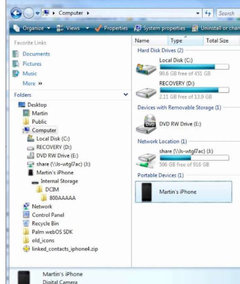
Can someone help me figure this out? Camera, IPhone & pics problem
8 years ago
Featured Answer
Sort by:Oldest
Comments (25)
 8 years agolast modified: 8 years ago
 8 years ago
Related Discussions
Can you help me figure out what is going on here?
Comments (6)Hi Julie, the task force website is very informative. I still wasn't sure if it was spring sickness or bugs. After reading that it seems it could go hand in hand. Upon further inspection I found a spider web at the base of that fan. Wonder if he set up camp there for a reason? In that link it seems that it starts as a fungal which leaves an opening for mites to enter. Not sure if spiders eat mites, but whatever he is eating he can call it home for as long as he likes. I've had a few others but they outgrew it MUCH quicker than this one. I wonder if it isn't caused by digging & dividing which allows a fungus to enter. They say it isn't as prevalent in the south & although they have tried to come to a conclusion on spraying for rust to see if that was a factor & apparently still spring sickness. BUT the folks I purchased plants from down there did a fungal soak before shipping them to me. Dakar I bought in the north where rust isn't an issue & know they wouldn't have soaked it in a fungicide. Since I've never dealt with rust I can't say whether the fungicide is used a systemic or not or if it could actually penetrate to the core of the crown. I kept records of where I got all my dls & will check when it gets light out to see which ones got it & where I got it from. I think the weirdest part about spring sickness is that it happens in sporadic years on the same plant. Now for those proliferations! I am so excited to try this & apparently both techniques work. From the AHS website you can link off to a Lee Pickles article describing both methods. Since I have 2 plants like the 1st pic, I will try 1 on the scape & 1 in water. Thanks for your help!...See MoreCannot for the life of me figure out how to post pics
Comments (16)The short story? Upload your photos to photobucket using the "800 by 600" pixel upload option. Done. You'll get a small file size but a photo that will display well. To answer your questions, here's the long story. And I'm not kidding. It's long. Way too long: "What I'm also trying to understand is the whole process: I take a picture with my 6.1 Kodak camera. The picture size is therefore________" Your file size depends on the settings on your camera at which you are taking photos. Most cameras offer a couple of choices, like "Image Quality: FINE/NORMAL/BASIC" and/or "Image size: LARGE/MEDIUM/SMALL". Those choices will define the amount of jpeg compression that your photo undergoes and thus they will define the size of the file that comes out of your camera. Generically a 6MP camera is probably putting out jpeg photos in the 2-3MB range. "Jpeg" is a compression program. It's a program that reduces the MB file size of the program by discarding redundant pixel color information from the photo's file for similar-colored pixels in the photo. It does not get rid of or discard any pixels. It just "averages" out red/ green/blue information assigned to similar colored pixels. jpeg looks at the photo's individual pixel information and says "these reddish pixels that are next to each other in this photo are so close in color, I'm going to consider them the exact same color". So it keeps the R/G/B information for one of the pixels, discards the RGB info for the other two, and assigns that saved RGB info to all three pixels. That allows your file to be smaller without destroying the overall visual integrity of the photo when you view it. If a file were to be over-compressed...too much information thrown away...then it can get ugly looking, very blocky. "When I upload it to Photobucket it remains 6.1 or do they change it as they "store it"__________" Using the default settings on PB it'll be uploaded as a small file. A MUCH SMALLER file. You've discovered the "Customize Your Upload Options" and you can use that to get a larger and more usable file size uploaded to your PB account. More about that later. "Of course talking about a picture in terms of 800x600 vs MB is confusing. " Your photo is made up of little dots, or to simplify, "pixels". If you have a photo that is "800 by 600", that's 800 pixels or dots wide by 600 pixels/dots tall. That's how "big" your photo appears. 800 dots wide. 600 dots tall. Each of those dots or pixels is a color, all those little colored dots together make up the photo. If each of those pixels is a different color, then the file size (the "MB" or "KB") will be large because the file has to store red/green/blue information for each and every one of those tiny pixels. If you take a photo of a piece of red paper, then theoretically the photo's jpeg file size will be smaller because so many of the pixels will be the same red color. The file doesn't have to "remember" as much red/green/blue information even though the number of pixels in the photo is the same. So if you take your glorious 6MP photo that's 3000 by 2000 pixels and upload it to Photobucket at the 320 by 240 pixel option, PB is going to throw way a lot of pixels. You uploaded a detailed file with 3000 times 2000, or 6 million pixels, and Photobucket is going to throw away and discard over 5.9 million of them! Gone forever! It'll display that photo small, 320 pixels by 240 pixels, so to the eye it will still look okay at that small size. But if you try to blow up or magnify the photo, pixels will have to be created to fill in the "holes", and the color information for those created pixels will be guessed at based upon what the neighboring pixels look like. You'll end up with a blocky looking photo. So the picture can have a physical size defined in terms of how many dots or pixels make up the picture. 3000 x 2000, 800 x 600, 320 x 240, etc. The pixels define how big or small the picture will be represented on your computer monitor or on a piece of paper when printed out. The photo file size, in MB or KB, is how much information is assigned to remember the color information of the pixels that make up the photo. 6MP is a large photo and will take longer to upload than a 1MP file. It's how much space the photo will take up n your computer's hard drive. I'm going to run you through a few examples, I hope this helps to clarify: I have a 2MB photo on my computer. I just uploaded it to photobucket, during the upload photobucket automatically reduced the file size from 2MB down to 38kb. Ouch! It reduced the pixel size (or the number of "dots" that make up the photo) from 3341 x 2217 (3341 pixels wide by 2217 pixels tall) to 310 x 212. That was done using the default upload setting of 320 by 240. This file is tiny, only 38kb, so it'll upload fast. But the small file can limit the quality of the photo seen by the viewer. Here is the quality of the 320 by 240 photo: By adding a "Width=" designator to the HTML code, I can make your browser display the photo larger. Previously it showed at 320 pixels wide, because that's it's size of the photobucket file. I'll add "Width=800" to make it display 800 pixels wide. Again, it's a 38kb file size, 319 x 212 photo that's being forced to display 800 pixels wide. Where did the extra pixels come from? They were made up, their color information copied from neighboring pixels in the photo's file. Since they had to be guessed at, the photo looks blocky due to the groupings of exactly-colored pixels all clumped next to one another: The photo shows larger, but it's blockier. Now going into photobucket's upload settings I chose "Best possible quality (while staying 1mb or less)". A large file size...but not ridiculous. Photobucket uploaded my same original 2MB, 3342 x 2217 pixel photo as a 745kb file that is 2301 pixels wide by 1527 pixels tall. At 745kb it's a large file size so it'll upload slower, but with all those pixels the resolution will be quite good. When I now have gardenweb show this new photo file at its native resolution, it looks like this: Since most people have their computer's screen displays set at 800-1200 pixels wide, this 2301 pixel wide photo causes you to have to scroll left/right to take it all in. It's not viewer friendly. So now I'll limit the photo by adding a "Width=800" to the html code and it'll show better. A better size, and with nice resolution: There actually is a point to this post, and it's this: Photobucket has an 800 by 600 upload selection. If you want a "bang for your buck" upload selection, use the 800 x 600 choice. Uploading my 2MB file using the 800 by 600 option gave me a 134kb file with pixel dimensions of 800 wide by 530 tall. A very manageable file size that will upload quickly, and a pixel size that will display nicely: Still awake? Not me. Zzzzzzzzzzzzzzzzzzzzzzzzzzzzzzz...See MoreCan someone help me with figuring out why this is happening?
Comments (14)Do not feel any guilt ridding your yard of this maple: it is a cultivar of the Norway maple, which is considered an invasive pest species. Here's a quote from the Western Oregon University: "The Norway Maple is an invasive pest that should be discouraged from growth." The purple form is commonly planted in suburban yards, and escapes by seeding itself all over. You would be helping the local environment by "discouraging" it from growth. Yes, the ginko and european beech are also not native, however, they are not known to reseed themselves wantonly around a neighborhood, county or state. Although beeches have very thirsty roots too, just thirst is not the point here; when it comes to competition for the entire environment , the Norway Maple can out-compete almost any other tree (there are other tree thugs too that share this infamy). Sunny...See MoreCan someone help me figure out material this is and how to clean it?
Comments (13)Maybe someone here with more knowledge about it than me could weigh in, but I wonder if you could do a skim coat of something like self leveling concrete to cover all the stains, then apply some coats of a food safe sealer over the top. I can't imagine that would look any worse than what's there and might be a short term solution. use on countertops...See More- 8 years agolast modified: 8 years ago
 8 years ago
- 8 years ago
- 8 years ago
- 8 years ago
- 8 years ago
- 8 years agolast modified: 8 years ago
- 8 years ago
- 8 years agolast modified: 8 years ago
 8 years agolast modified: 8 years ago
- 8 years ago
- 8 years ago
 8 years agolast modified: 8 years ago
- 8 years ago
- 8 years ago
 8 years ago
- 8 years ago
- 8 years ago
- 8 years ago
- 8 years ago
Related Stories

DECLUTTERINGCan’t Figure Out What ‘Sparks Joy’? Try This Question Instead
If you can’t decide whether to keep something or let it go, shift your perspective to find the answer
Full Story
MOST POPULAR9 Real Ways You Can Help After a House Fire
Suggestions from someone who lost her home to fire — and experienced the staggering generosity of community
Full Story
DISASTER PREP & RECOVERY7 Ways to Help Someone Hit by a Hurricane
The best things you can do in the wake of devastation are sometimes the most surprising
Full Story
DECORATING GUIDESGot a Problem? 5 Design Trends That Could Help
These popular looks can help you hide your TV, find a fresh tile style and more
Full Story
LIFEWe Can Work It Out: Living (and Cleaning) Together
Run a household without fussing and fighting with these ideas for how to work together on household chores
Full Story
LANDSCAPE DESIGNFire-Wise Landscapes Can Help Keep Your Home and Property Safe
Choose fire-resistant plants and materials and create defensible areas using these design strategies
Full Story
DISASTER PREP & RECOVERYHurricane Harvey: How You Can Help
Want to donate or volunteer to aid victims of the storm? Here are groups assisting with disaster relief and recovery
Full Story
DECORATING GUIDESHow to Decorate When You're Starting Out or Starting Over
No need to feel overwhelmed. Our step-by-step decorating guide can help you put together a home look you'll love
Full Story
DECORATING GUIDESSolve Privacy Problems With Window Film
Let the light in and keep prying eyes out with an inexpensive and decorative window film you can apply yourself
Full Story
BASEMENTSWant to Rent Out Your Basement? 6 Questions to Ask
Tapping your subterranean space can help you bring in extra monthly income. Here’s what to consider first
Full Story



User