

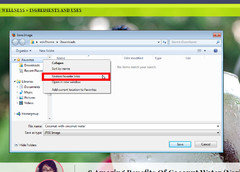
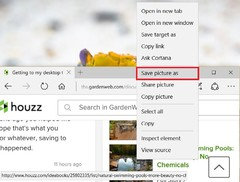
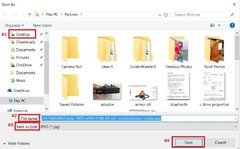
Getting to my desktop to save websites, pics, etc.
10 years ago
Featured Answer
Sort by:Oldest
Comments (10)
 10 years ago
Related Discussions
Seed saving etc.
Comments (6)Save my seeds in little coin envelopes but have traded for some that the folks made them out of left over wrapping paper and brown paper bags, reg paper that was folded to make a little pockets. Also at the craft stores they sell itty bitty plastic bags for around 1.29 for 100 of them....See MoreLost My Favorites, Email Addresses and Desktop Folders
Comments (8)Windows Vista Recovery is a fake computer analysis and optimization program that displays fake information in order to scare you into believing that there is an issue with your computer. Windows Vista Recovery is installed via Trojans that display false error messages and security warnings on the infected computer. These messages will state that there is something wrong with your computer's hard drive and then suggests that you download and install a program that can fix the problem. When you click on of these alerts, Windows Vista Recovery will automatically be downloaded and installed onto your computer. Once installed, Windows Vista Recovery will be configured to start automatically when you login to Windows. Once started, it will display numerous error messages when you attempt to launch programs or delete files. Windows Vista Recovery will then prompt you to scan your computer, which will then find a variety of errors that it states it cannot fix until you purchase the program. When you use the so-called defragment tool it will state that it needs to run in Safe Mode and then show a fake Safe Mode background that pretends to defrag your computer. As this program is a scam do not be scared into purchasing the program when you see its alerts. To further make it seem like your computer is not operating correctly, Windows Vista Recovery will also make it so that certain folders on your computer display no contents. When opening these folders, such as C:\Windows\System32\ or various drive letters, instead of seeing the normal list of files it will instead display a different folder's contents or make it appear as if the folder is empty. This is done to make it seem like there is corruption on your hard drive that is causing your files to not be displayed. You should follow the instructions in the link provided.. I would not suggest attempting to remove this yourself.. Here is a link that might be useful: Malware help!...See MoreGetting New Desktop for daughter - what I need to transfer?
Comments (3)If the old machine has a 40 gig drive and you have a 500 gig external available, I would just transfer everything. That way if you realize down the road you missed something, it's still available. If you need space on the external, move it to the new machine (just create a folder and move everything there). Most modern printer install from CD or a file you can download from the manufacturer's web site (which may be necessary if the original CD didn't include Windows 7 drivers). Don't plug in the printer initially, follow the on screen instructions and at some point during the install process it will ask you to plug in the printer....See MoreMy Desktop isn't showing when I turn on my computer. Why?
Comments (24)Wow, there is a lot of good information here. Glad I posted with my problem, now I have something new to try out. Thanks owbist. ravencajun, thanks for the compliment but I only had the first half of it figured out and cboy came to the rescue and helped me with the last half of it. I can't take all the credit. "Smiles" Then zep516 came in catching the fact that System Restore wasn't working right and gave me great information on how to correct that. This was the first time that I've had problems with my desktop, but I have changed the backround on it before and I remembered that and I thought why not check it out and see if I could get it to change and that is when I discovered that the backround had been changed and all I had to do was to put it back like I had it, but then I didn't know how to get the icons back and that's when cboy posted the solution for me. If that ever happens to me again I will know exactly what to do. Thanks owbist for telling me how to move the icons down to the taskbar. I will try that on Wednesday, I will have more time to try it out then. thirdfrt!!!...See More 10 years agolast modified: 10 years ago
 10 years ago
- 10 years ago
- 10 years agolast modified: 10 years ago
- 10 years ago
- 10 years ago
- 10 years ago
- 10 years ago


Related Stories

LANDSCAPE DESIGNGet Along With Less Lawn — Ideas to Save Water and Effort
Ditch the mower and lower your water bill while creating a feast for the eyes with diverse plantings and gathering places
Full Story
MEDIA ROOMSGet It Done: Organize the Media Cabinet
Ditch the worn-out VHS tapes, save valuable storage space and find hidden gems with this quick weekend spruce-up
Full Story
ECLECTIC STYLEGet Creative Salvage Ideas from Houzzers' Reuse Projects
Save money and show off your resourcefulness by borrowing from these creative home projects using salvaged materials
Full Story
LIFEThe Top 5 Ways to Save Water at Home
Get on the fast track to preserving a valuable resource and saving money too with these smart, effective strategies
Full Story
KITCHEN DESIGN7 Ways to Save on Your Kitchen Remodel
Discover key areas where you can economize and still get the kitchen of your dreams
Full Story
MOST POPULARGet Ready for the Smart Coffee Table
Intelligent tables with touch screens are reaching the consumer market, with all the power of personal computers and more
Full Story
HOME OFFICESSpace-Saving Tips for Your Small Home Office
When your workspace is tight, make the most of it with these ideas
Full Story
HEALTHY HOMEGet Cleaner Indoor Air Without Opening a Window
Mechanical ventilation can actually be better for your home than the natural kind. Find out the whys and hows here
Full Story
BUDGET DECORATINGPop Culture Watch: Get a Good Rap With Thrift Store Scores
Eight rooms that rock secondhand finds, in an ideabook inspired by rappers taking YouTube by storm
Full Story
KITCHEN CABINETS9 Ways to Save Money on Kitchen Cabinets
Hold on to more dough without sacrificing style with these cost-saving tips
Full StorySponsored
zep516